Thursday, April 12, 2012

Kahaani Review


Movie: Kahaani
Director: Sujoy Ghosh
Story: Sujoy Ghosh, Advaita Kala
Actors: Saswata Chatterjee, Vidya Balan and Parambrata Chatterjee

Review By: Vidit Bhargava

There was hardly a moment when the audience gazed down on their cell-phones to chat with their friends in this 2 Hour movie about a woman finding her missing husband, who doesn't seem to exist. At first, this Sujoy Ghosh directed thriller may be ignored as a yet another attempt to fix in some exotic disease on our protagonist and present it to the audience in a new look. Clearly we've had enough of that non-sense. But Kahaani is a completely different thriller, with a tightly woven script and brilliantly written characters.

Even though, Kahaani has been advertised as a thriller, our characters are not put into unnecessary mortal peril or being kidnapped and being ported to different continents. This being reminiscent of most modern day thrillers, be it books or movies. Kahaani provides thrills quite differently. There is that uncanny touch to it, that puts you on the edge of your seat, thinking of what will happen next. All this is done with a very subtle backdrop and some good background music, which makes you feel as if you were along side the main leads solving the mystery.


There is little to disclose about the plot here, there are many twists and turns which are served to you during the course of this two hour thriller. The story revolves around a pregnant Vidya Bagchi (Played by Vidya Balan) who has arrived in India in search for her missing husband. But the problem is, that there are no records about the fellow at all. What follows next is Vidya's pursuit in find her missing husband, filled with appropriate twists and turns.

The Plot is original, but it is slightly inspired by popular literature like the Dan Brown thrillers. You'll find a few ideas taken from the 'Dan Brown Thriller Stencil' in this movie. There is a gruesome prologue, seemingly unconnected to the plot of the film, A hit-man answering to a unknown caller and executing murders by the confirmation of an MMS. There even is a subtle epilogue fixed into the movie. But truth be told, Sujoy Ghosh has created a thriller which is much better than Dan Brown's attempts using similar tools.

Also the screen play is slightly inspired from Satyajit Ray's mysteries. The scene about running hot-water and Vidya Balan Opening the Windows of her room and sitting on the sill to see the city-scape are an ode to Satyajit Ray. But the director never lifted stuff directly from the books. In-direct references are only a tribute to the famous director. 

Acting is top-notch. Parambrata Chatterjee As Satyaki is phenomenal. Nawazuddin Siddiqui over does a little as the curt Intelligence Officer but is fine most of the time. The scene where his bellowing at Vidya Balan suddenly changes to a polite 'plea' was done with great poise. Vidya Balan is on a roll, this is probably her best performance we've seen in years. Moreover her character was written brilliantly, keeping any question of a weak performance at bay.


One of the key elements of a good thriller is to create an element of shock and surprise at the end i.e. the point where the mystery unfolds. Sujoy Ghosh, does it quite nicely and puts the audience into a complete silence. Of course the effects on audience may vary from place to place, you may hear a sudden gasp, a loud whistle, some praises or even claps. Trust me, The mystery is that good, no one seems to have complained so far. I heard from lots of people about the movie, and all of them were spell-bound about the climax, they said it was one of the best they've seen in a thriller. Personally, I think that the climax was great but it could have been done with much more intensity and could have created a bigger impact. People sometimes go to a Hindi thriller with toned down expectations about its mystery but Kahaani is not a 'Kahaani' to be Underestimated. But all is not so good about the film, even though the mystery is more or less brilliant, it does leave a loop-hole or two, which leaves you slightly disappointed.
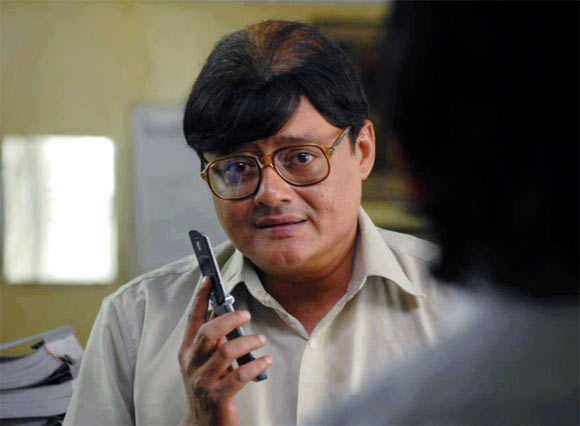


Anyone who has seen 'Kahaani' would really be dead scared of these words, "Namoshkar!... Main Bob Biswas. Ek Minute". Bob Biswas is easily the best hit man ever created in a Hindi Movie. Played by the talented Saswata Chatterjee, Biswas is an LIC Agent in the mornings, and a brutal Assassin after work hours. The character of Bob Biswas is exceptionally well written. The dual nature of Bob is what makes him so dangerous. He may look like a local Bengali, an every day working man with a job at one of the 'Daftars' with a tinge of charm. His polite demeanor, carefully masks his true blood and makes him look totally Harmless. Moreover, he doesn't even look like a Hit-Man, he is in his mid-ages, slightly overweight, gets tired easily and might not be the ideal choice incase of a quick escape. But that is hardly needed, since Biswas, is an Assassin of the first order, he completes his task without so much as a hint of suspicion on him. In a sequence in the film, Vidya Balan is thrown towards a speeding Kolkata Metro by our Assassin Bob Biswas , only pulled back in time to be politely asked to go away. The fear that creeps Vidya Balan and the audience is quite genuine. Bob Biswas, is a truly inspirational character. And Saswata Chatterjee pulls it off with great ease. I am sure, we'll be seeing more of him, in the near future.

Kahaani is an entertaining thriller which requires your grey-cells to be in great form. It's a blink and miss movie, you just can't move from your seats while watching the movie. It's certainty the best Hindi movie in 2012 so far and will be ranked amongst the classics in time to come. Also, the movie has a replay ability, even though most of the movie depends on a mystery. You'll still enjoy it because of its calm backdrop and awesome performances.


Rating: *** 1/2 /5 (Amazing)

Tuesday, April 10, 2012

There is a reason It's Developers Only

Vidit Bhargava
Yesterday I was reading a blog post on the internet, it was talking about how early Mountain Lion users were facing issues and how the same would not have been in Steve Jobs’ era. Hardly anything different from What Apple critics would say, but it left me to ponder on something. Why do people download Developer Previews when they aren’t developers?
Of course there is a reason why developer only previews are released, they are meant for developers who want to make their apps compatible to new standards, evaluate or suggest changes which will eventually help their firms make their product better and provide ‘users’ the best experience.
Quite certainly developer previews have some glitches, errors and aren’t fit for consumers at all. There isn’t any problem with that. Obviously That’s why they are developer only, so that developers can help software companies iron out any kinks in the software, to make them bug free and more secure before the final product comes out.
The problem arises when every kid with a tech blog and access to torrents downloads these previews and berets the software for having glitches, which puts forward a negative image of the software. Why peep into the kitchen while the food is being made?
Part of this Problem is the extensive media coverage a developer preview gets. Just minutes after the arrival of a new operating system’s Developer preview, the world of tech news is filled with In-Depth Previews of the developer preview. That is bound to make users excited to download the preview and try it themselves.
Using a developer preview can be disastrous for the end-user. Me being a developer myself downloaded a developer preview of Windows 8 a few months back to help myself with web-app Development, while the preview helped me test my HTML5 apps on the New operating system, it also posed problems beyond my reach! For example the frequent blue-screen of death while shutting down was a major issue and I was hardly able to debug it from my end. Eventually I had to give up the idea of using a developer preview and use my good old Windows 7 instead. The same happened while using early builds of the iOS5, though the problems were more controlled then and there weren’t many crashes and it was a more productive outing, which helped my app Development team to be on track with the latest operating system and the latest frameworks, but A few really irritating software issues were imminent even in the later stages of the Beta Program.
Summing it up I’d like to say, Developer previews are not for download unless you are actually a developer and not some techblogging teen geek.

All About the New iPad

Vidit Bhargava
Apple finally unveiled the third generation iPad on March 7th 2012. Just about an year after it had announced the iPad 2. I’d like to start with the iPad 2 today. To make it clear iPad 2 was a major design upgrade. The new Aluminum back was just about how much Apple could change the iPad’s look in one update. And hence, contrary to what others might say, iPad 2 was the design overhaul update and not a stability update. So let’s paste Apple’s upgrade trends for iOS devices now. The first update usually brings a design overhaul while the second update becomes a stability update for the first one without any significant change in design. Therefore, The Third Generation iPad had to be a similar looking, more stable version of the iPad 2. It’s just that. And goes a little further.
Let me walk through the ‘new’ iPad’s key-features one by one now:
Retina Display: The iPhone 4 was the first device to get a retina display and so everyone had hoped that it will come to the iPad 2 also. Turns out a Retina Display on the iPad 2 was not only expensive it also had technical difficulties to overcome, and so it came an year later to the iPad screen.
You’ve got to experience a retina display in person to know how it feels, it’s not the same thing as using one on an iPhone, it’s even better and brighter. Infact the 2048×1536 pixels resolution is even better than what an HD resolution would like on a tablet. The iPad with its Retina Display and IPS LCD has the best screen any mobile device (phone or Tablet) has ever had. And takes the 3rd Generation iPad miles ahead of competition in terms of graphics and display quality. Instantly all other tablets in the world, now look dull and of ancient ages. To top it all the new iPad maintains the same battery life of 10 hours which makes it all though more difficult for competitors to catch up with the father of all tablets.
5MP Camera: The back-camera which is now called an iSight Camera has got a major tech-bump in terms of image quality, the new iSight Camera, believe it or not, takes better pictures than the iPhone 4 camera. Even though both of them are 5MP. Yes, the key to great photography is not in the megapixels but the technology involved in the camera, and Apple’s idea of adding another lens and widening the camera aperture is a good one. And adds real color to the images.
There are obviously high-expectations from the camera, given that the same technology did wonders for the iPhone 4S. The initial shots look great, but I won’t comment on the quality before I actually lay hands on one.
A5X: it’s not A6 or last year’s A5. It’s the A5X processor. The A5X processor has a dual-core and quad-core graphics. Quad-Core Graphics engine now help the iPad to get better games with console-like graphics, Apple had demoed A NAMCO developed Action Game and the Infinity Blade Dungeons by Epic Games. Both of them had looked spectacular and the iPad like an equal amongst its console rivals.
So, while A5X might not bring a steep performance update in CPU, but graphics have definitely become top-notch. Hence the name A5X and not A6.
But a word about the technical specifications over here, Apple controls it’s own hardware and software and hence your new iPad is not likely to be a slow experience in any way. You are definitely going to get a blazing fast experience and by upgrading the hardware apple allows the developers to build better apps which provide a great experience to the customer.
While we can compare Android Tablets by the processor speed, RAM or any other technical specification, we cannot do the same when comparing an Android Tablet to the iPad. So, when we compare an Android Tablet to the iPad we will also have to compare the user experience of using the same apps on both the devices, moreover an overall experience is to be compared rather than a fragment of it.
4G LTE: While Indian users might not get the 4G speeds on the third Generation iPad when it launches, users in the US have a lot to be happy about, The new iPad is a 4G LTE device which comes with AT&T, Bell, Rogers and Verizon as supported 4G suppliers. Moreover 4G LTE means that the new iPad will allow for faster web-browsing and web-experience. So this is 4G, of know use in the Indian Market but of immense power in areas it is present.
Voice Dictation: Unlike the iPhone the iPad doesn’t come with Siri built in. The new iPad however has Voice Dictation. Voice dictation is a part of Siri, which takes voice input and converts it to text. We can expect Siri once it’s out of the beta stage, though.
Pricing and Availability:
16th March 201223rd March 2012*
United StatesBelgium
CanadaGreece
United KingdomIreland
FranceItaly
GermanyMacau
SwitzerlandMexico
JapanNew Zealand
Hong KongPortugal
SingaporeSpain
AustraliaSweden
* The 3rd Generation iPad will release In 26 European countries on 23rd March 2012. Only Some of them have been listed above.
Pricing:
16GB32GB64GB
iPad WiFi$499$599$699
iPad WiFi + 4G$629$729$829
iPad 2 WiFi$399--
iPad2 WiFi+ 3G$529--
Summing Up:
In a time where the only significant tablet in the market is the iPad, And others are only catching up, even a minor update to the tablet would mean even more to catch up for the competition. The new iPad builds on the image of the  previous two versions. And with more and more tablet buyers emerging everyday, the new iPad will gain on that front too.
A major selling point of the iPad will be the Retina Display, with the Retina Display the new iPad opens up an array of improvements that graphic based content could get. And along with the new quad-core graphics, everything on the new iPad will look brighter and wonderful, specially movies and nextgen games.
Should you Upgrade? Those who had bought the first generation iPad can upgrade now. The iPad has come a long way after its 2010 release, and with the new iPad being more of a stability upgrade, upgrading from the first generation iPad will definitely turn out to be a great idea.
For Those who had bought the iPad 2, an upgrade is not recommended. The iPad 2 is nearly as good as the new iPad but sans Retina Display.
For those wanting to buy a new iPad, it is a golden period to buy one.

Monday, March 05, 2012

The Next iPad. What to Expect.


Vidit Bhargava
This week Apple will unveil its next generation iPad at the Yerba Buena Center of Arts , the same place where the previous two models came out. This is hardly a rumor now, giving a glance to the invitation will confirm it.


Let's for a moment forget all speculations, rumors and leaks and think what would be a sensible upgrade to the most widely used tablet in the world.

What immediately comes to mind is that Apple will add this year's hardware. It will be a major hardware upgrade to start with. Having said that, this major overhaul is only going to be on the iPad's logic board, the casing will in probability remain the same. Purely going by the trends, the second 'update' to an iOS device has always involved bringing stability to the device, remember iPhone 3GS? It looked the same as 3G but was a completely different device on performance, the next generation iPad might also follow the same trend and add internal hardware changes than the superficial looks. Then there is a possibility that the iPad might just have a Retina Display this time. It is highly likely this year but if you'd have said the same for iPad 2 last year I would have been skeptical. It really wasn't feasible to fit a display of that quality in a 499 dollar price limit. Come 2012 and the situation is different, the displays industry has overcome the price hurdle, it seems. So Retina is very much on my list of the new iPad. A good camera is obviously a good idea, Apple's iPhone 4S had done some good stuff with the optics, i find no reason why they won't want the same technology to come their next most sold gadget. A similar looking iPad with a better display, camera and screen would be my pick for the 3rd generation iPad.

In terms of software, it might be iOS 5.1 which is obviously the long awaited minor update to the iOS that is in beta stages currently but who knows Apple might have iOS 6 under the wraps. Now iOS 6 also sounds plausible, after all it's not every year that they can afford to 'announce' a new OS at the WWDC, WWDC being their annual developers conference and  developers expect both hardware and software from it, not 'just' announcing software. But let's not deviate from the point. Whatever this new OS will be, what exactly will it have? The answer lies in Apple's Mountain Lion update. So first of all I'd like to highlight those features which the iOS is going to borrow from Mac OS X 10.8. First up, is the update to Notes. Notes are definitely set to have Picture embedding capabilities in them. Last month Apple showed us Notes coming for the Mac and it showed us how they synced well with the iCloud. So they definitely won't want to leave other devices behind in terms of the basic built in Capabilities. The next one is going to be Messages. Yes, Messages for the iOS is set to drop i from the name and become messages. It might also become more of a multi-purpose chat client, something that apple has envisioned to do with the OS X app of the same name. FaceTime will also get an HD update, that's something we had in the new OS X Lion but didn't in iOS5 so if iPad is going to get truly HD with all the retina display and airplay to HDTV's in HD, it should have FaceTime HD too. Safari is the next on the list. Apple had updated Safari last month, and now it sports a giant common search and address bar followed by a permanent Reader button. Frankly speaking Safari has never been better and the same will have to come on the iPad. All the above features will surely come on the iPad, but it all depends on how Apple plans to release its iOS and Mountain Lion. They may come later this year or they may be in your hands by the next week. And Now let's come to the iPad 2S (or 3) only features. Siri is highly possible. It might also drop the beta from the name. ILife and iWork are already present but Photos might get more Sharing options. If there is something new in works, I don't know it. I can only guess that it will either be an App Store App (which means it'll cost anything from $4.99 to $9.99) or an inbuilt app. But a few new apps are customary and will come for the next iPad only, this is certain. At the moment the best i can predict is Aperture and Final Cut Pro for iPad.

As for the name. I don't really think it is going to be iPad 3. iPad 2S, iPad, iPad HD are a few names I think the next generation iPad could be called.

Pricing will be the same. (Regardless of any rumor that is floating around.) the iPad might add the 4G LTE variant and they may merge it with 3G and charge a little more but it is slightly dubious at the moment. There might be more storage options too, 16GB iPads might make way for a 128GB model. The iPad might also have more accessories in store, an upgrade to the smart cover seems logical.

That's all there is to the mysterious new iPad. It will have no more or no less. Apple won't be showing off a 7 inch iPad. You won't be paying more for a retina display, though you might end up paying less if you are a student and the iPad won't be bulkier or have a small battery life, in short it won't have anything less than the iPad 2.

And One More Thing, The next iPad also will come with a heart melting video!

Wednesday, February 15, 2012

5 Books you Must Read [Part 1]

This is the first of the series, of my post on books that you must reads. So apart from the Harry Potters, Agatha Christie Books or Dan Brown Books which might depend on one's choice of books. These are the books that should not be missed at any cost.


1. Shantaram


Price: Rs. 419 | Buy Here
2. Steve Jobs


Price: Rs. 559 | Buy Here

3. H2G2


Price: Rs. 385 | Buy Here

4. The White Tiger


Price: Rs. 209 | Buy Here

5. The Alchemist


Price: Rs. 163 | Buy Here

Tuesday, January 31, 2012

How Revolutionary is Apple's foray into Education


Vidit Bhargava

An education based even was hosted by Apple, last month. The event emphasized on how the company will try to change the decaying American education system.


Phill Schiller took the stage to kick-start the education event by emphasizing that USA wasn't a leader when it came to global education. He didn't forget to mention that the iPad had been the most desired gadget amongst the teens. Phill also mentioned about iPad's contribution in helping students study.

There were three things, that Apple Launched that evening. I'd like to go through them one by one and try to give a feed-back on exactly how revolutionary they are:

1.    iBooks 2
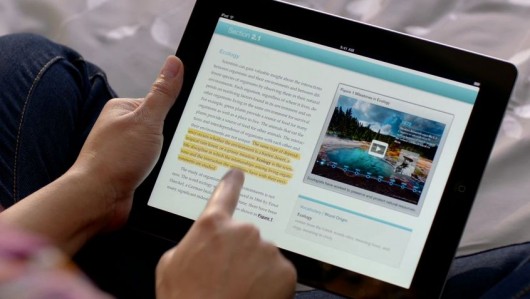
iBooks, Apple's book-reading app for the iPad now features some really interactive content from popular textbook publishers. These are books specifically designed for the iPad. They are interactive, more colorful and much less boring than the books you might be reading today. And They have the same quality of content.


One such book is  E.O. Wilson's Life on Earth. Its a biology text book which is fully loaded with interactive content. You can pinch inside a human cell, interactively study the parts of an insect, get video lessons, visit interactive image galleries related to the topic, test yourself and get an interactive feedback there and then. Apple has redefined how a book looks like.

While these books may be great when it comes to 'reading the content' but when it comes to the books which concentrate less on the reading material and more on providing extra questions, the interactive way of learning faces a challenge. When you add more questions and less of content, you ultimately end up compromising the interactivity of the book. Which is something you won't want because the selling point of these books is interactivity, followed by other supplementary factors.

The interactive iBooks also have a task of luring the kids into studies, while this may convert a few students and make them study 'more' but not many will 'start' studying just because their new books are on a touch-screen device, have a video or are interactive. Moreover to such kids, the iPad might prove to be more of a distraction than a learning ground. This is something perhaps no-one can change and technology's intervention doesn't help.

* iBooks 2 is a free update from Apple's App Store.

2. iBooks Author
This is a tool for the publishers. The iBooks Author lets you create interactive textbooks and test them on your device. It provides the Author with an opportunity to put content or add interactive media. This can be in the form of an interactive HTML5 widget, a 3D figure, a video or even a simple quiz. Publishers have a choice on what they can put.

iBooks Author is just like Instant food. It can create a new book in a matter of minutes. All you need is, the content to fit in and a suitable collection of pictures and video. iBooks Author manages almost everything. Also you can test your book on your iPad before publishing it to the iBookstore. Authors can choose their own price.

However, iBooks Author has a large scope of improvement. Not only do authors have limited control to how their book can look, many of the services are only linked to Apple's ecosystem. For Example if you wish to add an HTML5 widget you just can't embed an HTML file. You will need to create a widget using Apple's proprietary dashcode and then embed it into the iBook. There is also little modification you can do with a set template. You don't have much say when it comes to changing the look and feel of the book. This might lead to a set pattern of stenciled textbooks on the iPad, in the future.

Apple Likes having a full control in all its products and iBooks Author is no exception. Its dead closed and all you can do is, play around with the Apple software. Its like a Garden with many swings, but it is closed on all sides. No where to escape. No room to expand.

On the whole the iBooks Author is a good desktop publishing tool but there is a lot left to desire over here.

3. iTunes U
iTunes U has enjoyed a good 4 and a half years of existence. It has been helpful to all kind of students and provides a good variety of courses from the world's best universities. Apple decides to expand it now, with an iOS App.


The new iTunes U iOS App features courses. What are courses? Well, Courses are just like the courses you might attend at your college. They involve Video Lectures, Mini Quizzes, Assignments, Study Material and Tests. They are a digital replica of a college course. Not only does iTunes U help you get all the content, It also helps you maintain notes, and allows you to search through the study material and keep a track of your tests.

The iTunes U App is a nice addition. It is also the most effective way of learning and grasping content amongst the three announced by Apple.

The App has a good, clean and sensible UI which allows the users to concentrate on studying and lets them build a good understanding of whatever they are learning. Also the Tests, Quizzes and Assignments are very helpful.

--
Summary:
While Apple may like to portray how revolutionary these new iBooks and this Digital Content is, It remains to be seen how well it performs. The Book business might turn out to be as good as the iTunes Music Store or might end up being one of the few failures Apple has faced in the past decade. Completely changing a country's education system is a big task, This is just a small step in one direction. Only time will tell if it is the right direction.


Saturday, January 28, 2012

UltraBooks or UltraClones?

Vidit Bhargava

Sometime back, Intel introduced this term called 'Ultrabook'. It defines it as 'a higher-end type of subnotebook'. The definition itself is so complex, that you can imagine what kind of weirdly boiled mockery the Ultrabooks will turn out to be.

The CES this year was paraded by Ultrabooks from Asus, Acer, HP, Dell, Lenovo. Almost every computer manufacture wants to wet its hands in the supposed Ultrabook Revolution.

Two give you a clearer picture of what an ultrabook looks like Here are a few details about this 'Revolutionary' product that comes once in a while: The Ultrabooks are thin, lightweight, come in Unibody Enclosures and with limited ports. They also have a long-battery life. And almost all of them use 'Flash Based SSDs'. The display size is 11.6" to 13.3" or 14" at most. None of them features a CD-DRIVE.

And Now you may have a clear picture of what the Ultrabook will look like:


Looks familiar? Isn't it? Its the MacBook Air that was launched in 2010. The Ultrabook thing came in mid-2011. The Ultrabooks not only shamelessly rip off the design of a macbook air. They also boast of similar specifications.

Many people right now will be planning to press that 'x' button on their devices, since they fear this is going to go the fan boy way. As a matter of fact it is not. It is for the truth that I write this post.

Write from the design ergonomics to the keyboard color. Everything is being cloned in the name of Ultrabook. The only thin wall between an ultrabook and a macbook air is the CULV processor by Intel. The MacBook Air has the same processor as that in their MacBook Pro.

CULV (Consumer Ultra-Low Voltage) is a low power Intel Processor with Integrated Graphics. It is designed specifically for the Ultrabooks platform.

Intel plans to release these low-voltage processors in three phases. (For their three micro-architectures). Hence, dividing the Ultrabook launch in three phases also. The first phase is going to be ruled by the Sandy Bridge. Second will have Ivy Bridge and the third will have Haswell. When you 'know' that Intel has Ivy Bridge and Haswell in works, which are better processors based on relatively newer technology (one of them is that of 3D Tri Gate Transistors), then why will you settle for a Sandy Bridge Processor which looks like Yesterday's discarded waste when compared to the glorious tomorrow Intel Promises.

Having said all that about the Ultraclones, I will like to add that not all is so-clone like about the Ultrabook genre. While 'most' of the ultrabooks may look like Chinese fakes of the macbook air. There are a few that are promising and aren't that abominable. Lets get back to CES to see whether the Ultrabooks have something 'different' to offer than the image of an Ultraclone.

At CES 2012: There wasn't any interesting news this time. Motorola and Intel got into a deal, Android revealed 'design standards for Ice Cream Sandwich', Qualcomm rolled out a new Snapdragon processor and Corning came out with Gorilla Glass 2. And Then there were Ultrabooks, more Ultrabooks, and an almost uncontrollable flood of them. Most of them were clones, and are not even worthy of being covered in this post, but some of them were notable and deserve a little mention.

According to Joanna Stern of The Verge, The HP Envy Spectre, XPS 13 and Lenovo Yoga were the best Ultrabooks at this year's CES.

Lets start with HP's Spectre. Its a comparatively thicker solution to the Ultrabook. and that's probably because of the Gorilla Glass it sports. So while the Gorilla Glass is a neat-trick, those obsessed with extremely slim solutions for a laptop won't be very happy about it. It does have a good display and does sport the high-end ultrabook specs, which include a 128GB mSATA SSD, and 4GB of RAM with a Core i5 CULV processor and NFC capabilities. The only thing that HP seems to have copied from Apple's Macbook is the the color scheme. The black-keyboard on on a grey body. HP's Spectre is better than the rest of Ultrabooks and is priced at $13,999.

XPS13 by Dell is Dell's first dive into the Ultrabook market. When closed, the XPS13 can easily be mistaken to be a chinese clone of the Macbook Air. However it has a completely different feel to it when opened. The Interiors are all black. The Specifications of the laptop are also good. They are nearly the same as that of Spectre except the XPS has a Core i3 CULV processor and a lesser screen-resolution of 1366X768. XPS13 also has the gorilla glass. No NFC over here though. The laptop is priced at $999. XPS13 is good but I won't seriously consider buying it, when i can get better at $999.


The last one on this list is Lenovo Yoga. It was the most uniquely designed ultrabook at CES and it has nothing similar to the MacBook Air in terms of design. The laptop turn into a touch screen tablet, and runs Windows 8. I am not sure if this qualifies an ultrabook (We still don't know if it has that CULV processor or whether a laptop needs CULV to be officially called an ultrabook*) but it has most of the qualities of an ultrabook. It has a Flash SSD, a large 'quoted' battery life, it is thin and its ultraportable. The hinge-design of which i am not a fan of, is a neatly done, but 'Yoga' might just prove to be very bulky to play the role of a Tablet. Also, the hinge may not be very comfortable for both Laptop and Tablet users. The Lenovo Yoga (An Ideapad) will hit the stores only after Windows 8 makes a debut.


Final Words:
While the Ultrabook platform is flooded with clones, there are a few which do stand-out and perform better than others. However, Even they sport similar designs and uninspired technology. So Ultrabook is largely an exaggerated and mass cloned platform. The herd might just survive, or may turn out to be Netbooks 2.0. doomed to die.

* Ultrabook is a trademark owned by Intel and this post has no-intention of demeaning the sales of the Ultrabooks.