Something I've discovered recently is that it's really important to prototype things quickly, and one of my favourite ways to prototype is to make fake apps, What are fake apps? They're a fun way to create interactive mock-ups that don't incorporate real data but show only key interactions.
Did this for a project today, but also did it for LooKUp over the summer. Fun process.
Showing posts with label Apps. Show all posts
Showing posts with label Apps. Show all posts
Friday, October 03, 2025


Sunday, September 28, 2025
Camera is not an app: it's a memory capture tool
I've been wondering how the "Camera" should no longer be an app. Like Camera is a technology, and sure you can do the traditional thing of taking pictures, but by no means is that the only function of that technology on a personal computing device.
To begin with, it's a great cognitive offloading tool. It's the tool you use to take save receipts, books to read, food you've eaten, things you've done. Sometimes even medical readings if you're tracking them over time.
Photos are visual memory. The timeline acts as a tool for eidetic memory, or photo-recall; but mixing that with photos I take for Photography has interesting side-effects. The photos app is fundamentally not a note-taking app, so it's not smart enough to serve as one and thus curtails the technology's ability to serve as the center piece of computing that it is.
I think the next killer camera app is not one that helps you take better pictures, but one that combines taking pictures with it being a photographic memory.
To begin with, it's a great cognitive offloading tool. It's the tool you use to take save receipts, books to read, food you've eaten, things you've done. Sometimes even medical readings if you're tracking them over time.
Photos are visual memory. The timeline acts as a tool for eidetic memory, or photo-recall; but mixing that with photos I take for Photography has interesting side-effects. The photos app is fundamentally not a note-taking app, so it's not smart enough to serve as one and thus curtails the technology's ability to serve as the center piece of computing that it is.
I think the next killer camera app is not one that helps you take better pictures, but one that combines taking pictures with it being a photographic memory.
Monday, September 15, 2025
Missed posts: What have I been upto this week
So why am I missing so many posts. What's up, why is the blog post momentum suddenly slowing down. Well, I have been working on updating my app for iOS 26. And I started a redesign project at that. So the whole process has decidedly taken way too long and too much time. for me, which is why the blog posts have become a formality for the last two weeks.
That said, the update is live now and I'll be back with more fun stuff.
That said, the update is live now and I'll be back with more fun stuff.
Saturday, September 13, 2025
A new coat of paint always does wonder.
Was redeisgning certain parts of my app that I barely had the time to touch. Gave them a new set of gradients. And now they look straight outta 2026! :D
Thursday, September 11, 2025
Crunch Time for LookUp Updates
Been working for the last 12 hours. Crunch time here for LookUp updates. I did a crazy redesign with a crazier strategy. The result is that Betas are lagging far behind the actual progress. This has been the most insane update cycle, with practically no beta. Not gonna do this again.
Thursday, August 28, 2025
Is it actually better to not study UI design at all?
Was rummaging through old files, and found one of the early LookUp designs that was very colorful and changed background colors with different modes.
I miss how I could go crazy about my designs when I didn’t study design and didn’t know any better. Back in 2014, I had very little design awareness, I had taken one coursera course and that's about it. So I had no idea what "platform conventions", "consistency" meant. I was just too happy to be designing something. So the first iteration for LookUp was a massive change. It involved crazy colourscheme changes and a completely navy-blue and dark color theme.
Ofourse now I know better and now software must support a 1000 other modes, including light and dark, and every platform has its own convention and want not. It makes me wonder, how much of design education is seeking conformity to norms and how much is it really about expressing yourself.
Consistency is a term that's been borrowed, weaponised and industrialised in teh last few years. From meaning that two similar things should look similar so that people are not confused, it's gone on to mean complete conformity with the interfaces ordained by the company's star designers and the branding that the OS provider uses; more recently it also means taking the fun out of your icons because everything must look the same and everything must support the 10 other modes that the OS provides. Right?
Anyhow. Here's LookUp 2. I had so much fun making this design, more than 10 years ago.

I miss how I could go crazy about my designs when I didn’t study design and didn’t know any better. Back in 2014, I had very little design awareness, I had taken one coursera course and that's about it. So I had no idea what "platform conventions", "consistency" meant. I was just too happy to be designing something. So the first iteration for LookUp was a massive change. It involved crazy colourscheme changes and a completely navy-blue and dark color theme.
Ofourse now I know better and now software must support a 1000 other modes, including light and dark, and every platform has its own convention and want not. It makes me wonder, how much of design education is seeking conformity to norms and how much is it really about expressing yourself.
Consistency is a term that's been borrowed, weaponised and industrialised in teh last few years. From meaning that two similar things should look similar so that people are not confused, it's gone on to mean complete conformity with the interfaces ordained by the company's star designers and the branding that the OS provider uses; more recently it also means taking the fun out of your icons because everything must look the same and everything must support the 10 other modes that the OS provides. Right?
Anyhow. Here's LookUp 2. I had so much fun making this design, more than 10 years ago.
Wednesday, August 27, 2025
Missed post: More Shader Fun
Missed yesterday's blogpost of the day, as I was working on a major redesign for my app LookUp (which I now realise I haven't talked about at all on this blog) but for the last 13 years I have been working on a dictionary app called LookUp which enables english Learners to build their vocabulary. I am frantically working to ship a major redesign of the app currently. So more on it later.
But here's some fun stuff I did with shaders. I like to think of it as the Liquid from the Liquid Glass. ;)

But here's some fun stuff I did with shaders. I like to think of it as the Liquid from the Liquid Glass. ;)
Sunday, July 27, 2025
A glimpse into how I prep for Pizza

Here's a glimpse of how I prep for Pizza. Dough Proportions are tough, especially the yeast. This thing helps me make accurate measurements so I can prep my dough. Not the prettiest app that I've made and I want to make a ton of changes to it before ever shipping it, but for now it just works for me.
Tuesday, October 02, 2018
Robotic Food Delivery: My Experience with Kiwi Bot


There’s no doubt though, that the real crowd puller for kiwi is the Bot that’s currently trotting the sidewalks of Berkeley. A bright blue flag hangs on the petit bot to make the vehicle noticeable to the people walking on the street. The bot moves cautiously, looking twice before crossing a street. It’s a pleasant looking design which seems as though it was internally designed, as opposed to getting an off-the shelf vehicle.
For some reason, Bay Area’s budding entrepreneurs in the food sector seem to be obsessed with removing human interaction between the restaurant and its customer. Last year it was food being put in lockers for customers to collect, by Eatsa , this year it’s Kiwibot which aims to replace delivery boys with delivery bots. Dominos has had something similar in the US for a few months now, but this is the first time that I witnessed it, and it definite- ly caught my attention. So I decided to give the app and the experience a try.
 |
| The onboarding process for Kiwi; Do we really need these screens at this point in the user flow? I think some of the permis- sions could be asked for at a later time. |
Straight up, the onboarding experience isn’t very appealing. It’s just a bunch of screenshots that inform the users about the permissions they must give in order to use the app effectively. Personally I found that the app didn’t really need those permissions on first launch, you can ask me to give a permission for notifications when I place the order, my location information can be asked for when I’m looking for restaurants. The images on display weren’t optimised for iPhone X either, I could see text being cut off by the margins, but that seems like a problem which can be fixed with a minor update. The bigger problem is the fact that, the first launch screen exists in the first place, I’d personally do away with it, or talk about the product on that screen instead of prematurely asking permissions.
The layout for selecting the restaurant is pretty simple. There’s just a list of avail- able restaurants and pressing one of them leads you to another simple list of menu items, you can customise them if that’s possible for the particular item (for example you’ll need to customise a burrito from Chipotle). The flow works fine if you’re not customising your order. If you are customising the order it gets con- fusing very quickly, moving back from the customisation screen actually cancels your order, and you need to start again, however if on the customisation screen, you tap the add button, it actually takes you back to the order screen but this time with the order quantity selection element on the screen, after which you can confirm and setup the payment and address information. It’s also surprising that the app doesn’t use a lot of system elements. For example there’s no auto fill for credit card information, so you need to input the card details manually.
Once the order is placed the app should show you a map with the position of the bot (which didn’t work for me during this particular order but I suppose it was a one off bug); The screen also features an unlock button which gets activated once the bot reaches the location.
While the ordering experience wasn’t great, I managed to place the order without much of a hitch. The receiving part was also pretty much seamless. I just had to press the unlock button in the app and the bot opened to show the food item neatly placed in the buggy that also serves as a hot-box. It seems as though Kiwi has spent quite a bit of time perfecting the delivery vehicle.
And the app’s improving quickly. In the month since I’ve used Kiwi there seem to be minor improvements already. It’s good to know that the creators are tak- ing feedback seriously.
But is it really better than having your food delivered by a human being? I don’t think so. Once the novelty of a cute robot delivering your food dies off, the only scenario where this may be feasible is is when its hard to find people to de- liver food items, or there’s an economic benefit for the restaurant to have your food delivered by a bot. While it was fun to see my order delivered by a robot, I wonder if it’s something that popularises any time soon.

The user flow for ordering a customised meal with Kiwi. While it’s better to have a bare-bones approach to the process than to offer fancy animations for no reason, sometimes even the simplest of interactions can become confusing.
In this case it was the app going ‘back’ to the previous screen after pressing “add” that lead me to believe that if I were to do the same, it’ll still retain my order information. It didn’t and I had to start over.
Sunday, July 16, 2017
Restaurant from the future: Eatsa
Vidit Bhargava
The world’s first automat, a restaurant where food and drink were served by vending machines was first introduced in Berlin in 1985. The concept of getting food from a vending machine enjoyed a good 80 years or so, until it was eclipsed by fast food chains, like Subway, which had a greater flexibility of food selection and payment options.

However, as if in a revenge plot of sorts, an automat has surfaced in the United States, which aims to disrupt the Fast-food market by combining the flexibility of a counter-preparation model and modern day automation technologies to deliver food faster and cheaper. The experience is as though you were being served food by robots.

As you walk into an Eatsa, you’ll find yourself in a room with an array of iPads lined up to take your order And a grid of cubby-holes which‘ll host the food you order. It’s a futuristic experience, in the sense that there’s minimal human interaction involved. You’re expected to interact with the iPad, place your order and get your meal, all in a couple of minutes. You’re aren’t even supposed to know that there are humans preparing the food behind the cubby holes. Much like how Elves prepared the great feast in the kitchen below the large dining tables of the great hall in the Harry Potter series, and you wouldn’t know they were the ones toiling away in the dungeons unless you were Hermione. It’s the quickness of the service and the ease of placing an order that really transforms Eatsa’s experience and Eatsa’s proprietary automation tech is to be credited for it.
The Experience of Ordering food
Food ordering was a relatively simple process. You just need to sign up for Eatsa, pickup your nearest restaurant and begin preparing your meal, either either by selecting a preset food or by “Starting from scratch” and selecting your own ingredients.

I really liked the customisation options here. You can select whatever base you want, and while quinoa is pretty much the central attraction, you can even pick stuff like “Channa Masala” or “Pinto Beans” and then of course there’s an assortment of sauces and crunchies to pick from.
Eatsa’s offerings are vegetarian (with the exception of eggs, which appear to have a vegetarian status in US) and in general focus on a healthy diet and given that Eatsa’s target audience is primarily office-goers or students in need of a quick lunch, these options seem specially lucrative. Moreover, Eatsa’s app is intelligent enough to inform about potential allergens and offers filters to remove items which may contain them. This is especially handy for some one like me, who’d otherwise have to check with the staff and rely on their word for such information.
I also liked the attention to detail and the polished user interface of the app. The interactions were fluid, information clearly presented and the experience reliable, whether you’re using a kiosk or an app on your iPhone. It feels like a premium experience, at a cost that’s even cheaper than your local McDonald’s or Subway.
Once the order is placed from the app, and the food ready, your name appears to on one of the cubby-holes, which you can then double tap to unlock and get your food. While the food is still being made by humans, there’s a good deal of automation going in the background to get the food ready in a very short span of time. Usually the waiting time for something like this would be 5-6 minutes. But Eatsa’s service is a lot quicker than that. If you were placing your order at home / office and going to a store for pickup, you wouldn’t really have to wait for it to get ready. You can just walk-over to your cubby hole, pickup your food and get working.

That’s why I feel the experience is futuristic, it eliminates a lot of traditional concepts that’ll be in such a restaurant, and ultimately offers food at a very affordable cost. The experience is friction less, extremely convenient and even somewhat /delightful if you are watching this happen for the first time, these factors should really help Eatsa get a foothold in the Fast-food space quickly.
Food Quality

I especially liked the texture of the roasted potatoes and tofu. They were all well cooked and blended well with the rest of the ingredients.
If I were to eliminate the fact that I was visiting a restaurant that felt straight out of a Jetsons episode, I’d still want to visit the place again, since it provided a pretty delicious lunch.

But here’s the thing, Eatsa doesn’t have a lot of outlets right now. There are a couple of them in San Francisco, one near UC Berkeley, and a couple of them in New York and Washington DC. Eatsa’s only two years old right now, but it’ll need to be in a lot more places very soon to be able truly unleash the second coming of Automats.
Friday, June 22, 2012
How Apple Passbook Works

Apple released their latest iteration of iOS, last week at the WWDC 2012. Amongst many enhancements (which included a completely new vector based maps tool too) the announcement of a new inbuilt app called Passbook was slightly side lined. What exactly is Passbook? Or How is it going to change our Wallets?
Passbook is a pre-installed iOS 6 Application which will let you view your digital gift cards, coupons, boarding passes, shopping cards, etc. You can then use them instead of their offline counterparts.
 Say you book a travel ticket, and receive an online boarding pass via email. Now at the airport you’ll have to search through your emails for that boarding pass and then get it scanned. Apple simplifies this task with the Passbook tool. The Airlines can create a Passbook based boarding pass and share it to you via email, which you can then open in your passbook application. Once in the passbook app, your new digital boarding pass will be updated real time. Also when you are near to the airport a push notification will come up at your lock screen, through which you can instantly access the pass!
Passbook can also store your movie, sports tickets, gift cards, store cards or whatever that qualifies as a coupon, pass or ticket.
Here’s how it works: The developer creates a passbook pass using Apple’s Pass-Kit API and then shares it to the user via Email, URLs or an iPhone App. The User then opens up the pass (ticket, coupon or card) on his phone, which takes him to the Passbook app and the pass is stored. Now the user can get push notifications for his pass. (For Example, if a certain store whose store card is in your passbook is near by, a notification will come up on your phone telling you that a certain store is in the vicinity, you can then open it to use it, as you enter the store)
 Passbook is sure to provide a very productive future to the iOS Users. Almost certainly the weight of wallet is going to drop a bit, as you get rid of all those membership cards and gift coupons and instead store them on your phone.
But Passbook is a little far from perfect. There is a certain lack of availability of advanced 2D Bar Code Readers at many places. Currently Passbook Passes are restricted to embedding 2D or QR Bar Codes only, this is going to demand inputs from the companies to install the new and more expensive 2D Code Scanners at their shops. Here Developers might have to step in, by providing necessary hardware for many of their clients. The same is going to be a problem with many other countries all over the world. So if major outlets are willing to provide these services, they’ll need to actually have proper hardware first.
The success of the Passbook depends on how companies take steps to utilize it and how fast they install the necessary hardware. With Passbook Apple is not trying to digitalize your wallet but its creating a tool for online Passes. Much like what Adobe Reader is to PDF files, Passbook is to Digital Passes (only those created via Apple’s Pass-kit!)
Tuesday, January 31, 2012
How Revolutionary is Apple's foray into Education
Vidit
Bhargava
An
education based even was hosted by Apple, last month. The event emphasized on
how the company will try to change the decaying American education system.
.jpg)
Phill Schiller took the stage to kick-start the education event by emphasizing that USA wasn't a leader when it came to global education. He didn't forget to mention that the iPad had been the most desired gadget amongst the teens. Phill also mentioned about iPad's contribution in helping students study.
There
were three things, that Apple Launched that evening. I'd like to go through
them one by one and try to give a feed-back on exactly how revolutionary they
are:
1. iBooks 2
iBooks,
Apple's book-reading app for the iPad now features some really interactive
content from popular textbook publishers. These are books specifically designed
for the iPad. They are interactive, more colorful and much less boring than the
books you might be reading today. And They have the same quality of content.
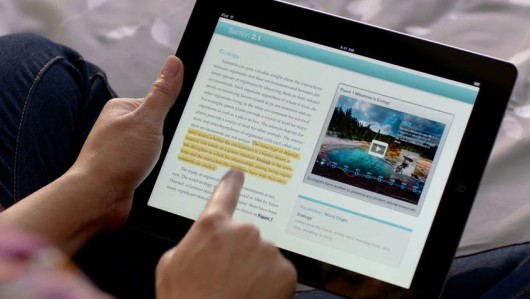
One such
book is E.O. Wilson's Life on Earth. Its
a biology text book which is fully loaded with interactive content. You can
pinch inside a human cell, interactively study the parts of an insect, get
video lessons, visit interactive image galleries related to the topic, test
yourself and get an interactive feedback there and then. Apple has redefined
how a book looks like.
While
these books may be great when it comes to 'reading the content' but when it
comes to the books which concentrate less on the reading material and more on
providing extra questions, the interactive way of learning faces a challenge.
When you add more questions and less of content, you ultimately end up
compromising the interactivity of the book. Which is something you won't want
because the selling point of these books is interactivity, followed by other
supplementary factors.
The
interactive iBooks also have a task of luring the kids into studies, while this
may convert a few students and make them study 'more' but not many will 'start'
studying just because their new books are on a touch-screen device, have a
video or are interactive. Moreover to such kids, the iPad might prove to be
more of a distraction than a learning ground. This is something perhaps no-one
can change and technology's intervention doesn't help.
* iBooks
2 is a free update from Apple's App Store.
 2. iBooks
Author
2. iBooks
Author
This is a
tool for the publishers. The iBooks Author lets you create interactive
textbooks and test them on your device. It provides the Author with an
opportunity to put content or add interactive media. This can be in the form of
an interactive HTML5 widget, a 3D figure, a video or even a simple quiz.
Publishers have a choice on what they can put.
iBooks
Author is just like Instant food. It can create a new book in a matter of
minutes. All you need is, the content to fit in and a suitable collection of
pictures and video. iBooks Author manages almost everything. Also you can test
your book on your iPad before publishing it to the iBookstore. Authors can
choose their own price.
However,
iBooks Author has a large scope of improvement. Not only do authors have
limited control to how their book can look, many of the services are only
linked to Apple's ecosystem. For Example if you wish to add an HTML5 widget you
just can't embed an HTML file. You will need to create a widget using Apple's
proprietary dashcode and then embed it into the iBook. There is also little
modification you can do with a set template. You don't have much say when it
comes to changing the look and feel of the book. This might lead to a set
pattern of stenciled textbooks on the iPad, in the future.
Apple
Likes having a full control in all its products and iBooks Author is no
exception. Its dead closed and all you can do is, play around with the Apple
software. Its like a Garden with many swings, but it is closed on all sides. No
where to escape. No room to expand.
On the
whole the iBooks Author is a good desktop publishing tool but there is a lot
left to desire over here.
3. iTunes
U
iTunes U
has enjoyed a good 4 and a half years of existence. It has been helpful to all
kind of students and provides a good variety of courses from the world's best
universities. Apple decides to expand it now, with an iOS App.

The new
iTunes U iOS App features courses. What are courses? Well, Courses are just
like the courses you might attend at your college. They involve Video Lectures,
Mini Quizzes, Assignments, Study Material and Tests. They are a digital replica
of a college course. Not only does iTunes U help you get all the content, It
also helps you maintain notes, and allows you to search through the study
material and keep a track of your tests.
The
iTunes U App is a nice addition. It is also the most effective way of learning
and grasping content amongst the three announced by Apple.
The App
has a good, clean and sensible UI which allows the users to concentrate on
studying and lets them build a good understanding of whatever they are
learning. Also the Tests, Quizzes and Assignments are very helpful.
--
Summary:
While
Apple may like to portray how revolutionary these new iBooks and this Digital
Content is, It remains to be seen how well it performs. The Book business might
turn out to be as good as the iTunes Music Store or might end up being one of
the few failures Apple has faced in the past decade. Completely changing a
country's education system is a big task, This is just a small step in one
direction. Only time will tell if it is the right direction.
Sunday, May 22, 2011
Music Locker
Vidit Bhargava
How many of you own a cloud? Well, as far as I know, many of you own a cloud or two, without even knowing about it! Cloud Computing is the buzz-word these days. Everyone wants to jump into the cloud business. The People are also willing to put their documents on the cloud, rather than carrying them in a pen-drive or a CD. Well Naturally People also want their Music Collection to go everywhere with them and not with an extra-burden of carrying a CD Case or an external hard-disk everywhere. Music Lockers they are called. And Currently two large companies are giving them this facility for free.:

1. Amazon CloudPlayer
Launched in March 2011, Amazon CloudPlayer is one of the few online music lockers, which one can 'use' outside USA. The Amazon Cloud Player, to its U.S. users offers a service to download the tracks from their online store to their cloud Drive and an option to use their Cloud Drive to upload their own songs. So you can listen to the tracks you've already downloaded. You can use your Amazon CloudPlayer ID to play the tracks anywhere in the world.

The Option to Buy the tracks and store directly to the cloud drive, eliminates the computer hard-disk in the process of listening the music. This is a really good thing because it saves the user from the hassle of downloading a song and uploading it back again.
Connectivity: The cloudplayer can be opened from any Web Enabled Device. You just need a good browser and a decent screen size to peacefully play tracks. However you'll find a dedicated application for Android Mobiles (Only in US) also.
 2. Google Music Beta
Google Music Beta was announced at the Google I/O held this month. While Google's Music is very much 'similar' to Amazon's cloudPlayer it is not exactly the same. Google Music provides the users with an online storage for their songs, A Dedicated application for the management and uploading of music, An Android App and a Website that allows you to listen music anywhere. Also Google Music has a feature to work offline on all devices, so if you are out of internet coverage it can play the recently played tracks.
While Amazon does provide users with an option to download the music straight from an online MP3 store. Google has no such option. So basically what you'll have to do is this: Download a song from the internet and then put it back up. And that is a tiresome job.
Connectivity: Google Music is currently in Beta Stages and available by invitation only and the service is only for the US Residents while it is still in the beta stages. As far as Mobile Devices are concerned, Android users are getting an app and others can use the website to play music, which innocently touts a flash interface, blocking the iOS Users from using it.

We just saw two different cloud music lockers. Both of them work on your input. You need to download a song first, and then you need to upload it to the cloud again, just for the sake of using it everywhere. And you are doing this for every song you download, and if this service at all gets popular, the same process will be done by millions of people making millions of duplicates of a single song on the internet, contributing to a lot of Digital Garbage. This is different when you use your iDisks and Dropboxes to put files on the internet, those are unique files you won't find elsewhere. And it is wise to store it on a single location rather than making multiple-copies of the same file on every computer.
Let the Music be on one Single Cloud And let users take the music from there. This way, more and more people can listen to music through one source. Also The Music Locker should directly be connected to the Music Application we currently have on our computers, and Mobile Devices. And if possible we can make it available to everyone in the world and not just the United States (Where every cloudplayer seems confined today).
Wrap Up: Currently Cloud Music is Very Amateurishly implemented. Companies want a lot of input from their users, who are unwilling to take the pains. Cloud-Services need to be tackled differently for every different utility. While the current approach may be good for Text and Picture content, it is naive to think it will be the same for Music and Movies. However, if you are too despirate to use Cloud Music Players, I'd suggest the Amazon Cloud Player, which requires the least effort from your side.
Monday, March 14, 2011
Stick Cricket iOS App - Review
Ah! You see, I've been better than my word! Here's a new blog-post, in just no time!


Game : Stick Cricket
Rating : 8.6/10
Price: Free

Vidit Bhargava
You've got a paper toss game to pass your time throwing paper. You've got a game to shoot birds at pigs, you've got a game for everything but you don't have one decent game for Cricket. Well, now you've got one. Its the same one, you play while on the internet. Yes, you heard it Stick Cricket is now on iOS.
Eh Bien! For those of you who have already played it, you'd know, the game is addictive. It is super addictive. You've got no tension of bowling full length 50 overs or getting hit for runs, you just need to sit and hit sixes (with some good timing), that's it. And score as much as you can. Its Cricket, but its far more fun playing on the iPod (the iPad app hasn't arrived yet).
Gameplay: Its snappy. You've got 5 Overs to score as many runs as you can. Or you can chase down a hefty total and dominate the world world with a bunch of oldies (the likes of Jayasurya and Gavaskar).

What hampers the experience is a block! You don't get a full experience for free. After dominating three teams in the domination, you cannot dominate more "Without paying $2.99". More so, the two-player mode is disappointingly also in that $2.99 package. Then there is a whole world cup in front of you which cannot be played before upgrading. All This is free on the internet version of the game by the way.

Graphics: You don't expect great graphics from this game. Its the classic, stick-figure game. So you won't be seeing a next-generation graphic render of the Sachin Tendulkar while playing India in the all-star slog. So you see, graphics is not a forte of the Stick Cricket App.
GameCenter integration : Ok, now you've scored the runs, you paid some money, you've mastered your skills on the App, and won the world cup. Can you have competition? Oh... Yes, its the natural GameCenter integration you've got here. You can challenge your friends on the All-Star Slog to hit the maximum number of runs. You can get some wild achievements too like "Scoring a Century by one batsmen in 5 overs" or "Scoring 36 in an over" . Also, on the world stage you can compete, with the highest run-scorers. (I've not risen above the 725th Rank so far! )

Addictivity Meter: Angry Birds is addictive. Yes. Paper Toss is Addictive. Yes. But can a cricket game have so much power, to be addictive enough? The answer depends on the fact that how-much of a cricket fan "you" are. Well, I am a giant fan, in that matter. So My answer is Yes! It is as addictive than any other app in the app store.
Wrap-Up: Cricket fans will love it. The gamers will crib over the graphics. While the guys, who play for fun, will be playing it for hours until the batteries die.
Subscribe to:
Comments (Atom)