I can say with a fair amount of confidence that I and the majority people around me, neither want or need a new way to send text-messages, play music, or ask Chat-GPT random questions. That's one part about why I don't find the Meta Glasses to be impressive.
The other part is the assumptions. The assumption that people are dying to get a new form factor to move on from the touch-screen phone. People are either don't think twice about using their phone, or are sick and tired of technology invading every part of their lives.
The former doesn't care about a new way to message friends, the latter would puke at the thought of smartphones strapped to my eyes, so that they can see what I am seeing and act on it; that to by Meta.
So why is it a foregone conclusion that AR glasses would ever be a thing. IMHO the next computing revolution would be one that helps us use less of technology; not one that shoves it into our face.
Showing posts with label Announcements. Show all posts
Showing posts with label Announcements. Show all posts
Thursday, September 18, 2025


Wednesday, September 10, 2025
Customary Apple Keynote Post

Back to watching these live. Last couple of years with classes, I don't think I saw any of the videos live apart from WWDC. But then again, there's something to be said about the fact that this is the 19th iPhone introduction keynote. I don't know about others, but I am a bit bored. I can't watch feign interest for an event that's been happening like clockwork.
Don't get me wrong, I still like the new iPhones, the Air looks ridiculously good (barring the camera bump), but the fact remains that these videos are winnning no one over. People will buy a new iPhone when their old one is no longer good. Everyone has their own cadence. Some buy every 3 years, some every 5, but at the end of the day, if you're an iPhone person you pretty much know it, and if you aren't you know that too. Nothing that Apple introduces is likely going to convert an Android user who was holding out for one killer feature that the iPhones didn't have.
So yea, that's my two cents on this.
Friday, September 12, 2014
Notes on Apple Watch
Vidit Bhargava
It's January 9th 2007, Steve Jobs is on stage, he's showing the world a better smartphone. You already want one. It's beautiful, elegant and potentially life changing but you don't see a lot of use instantly.

That's exactly how it felt when Tim Cook showed the world Apple's first generation SmartWatch this week. It makes other smart watches seem like ancient stone work.
Little is known about the Apple Watch at the moment. There are few details, a lot of questions and only some answers right now. I'd like to draw your attention to a few key points though:
First it's a watch. Looking at the Apple Watch from a watch buyer's perspective, I'd say it's pretty neat. Nothing comes close at this price range that's as beautiful or as well made as the Apple watch. Add to that the watch faces are phenomenal, I specially like the analog watch faces, they look elegant!
Here's a what Benjamin Clymer of Hodinkee had to say from his first impression
Looking at the watch one realizes just how much detail has gone into the making of the Watch. The curved glass blends perfectly into the stainless steel watch enclosure, the rich detail on the digital crown gives it the right fit, finish and feel for a watch crown. In terms of sheer watch design Apple's competing with neither of Motorola, Samsung or Pebble. It's taking a direct shot at brands like Tag Heuer, Seiko or Hublot.

But The watch's construction is quite like any of Apple's first generation products. Just like the first iPhone or iPad, it's a little thick, the screen resolution could get better but I'm sure that the Apple watch will only get better and thinner in the next few generations of the watch.
 Another interesting point to note here is the strap
design. A few months back when I first heard the rumor of an apple designed watch, I looked at mine and instantly felt the need of a better strap, I've used a leather strap before and am currently using a velcrow strap for my wrist watch and both of them are quite terrible.
Looking at the six different strap variants I was quite pleased to see the Milanese Loop and the Leather Loop feature in the list both of them solve my watch strap problem quite efficiently. I guess the Milanese loop might be more high end but that's the one that I've found most appealing yet.
As for the software, I like the customizable Watch Faces and the new messaging app which allows you to draw and send short messages to other Watch users.

But the thing that's most exciting here is a feature called “Glances” which basically presents quick access to things like the Weather widget or the Apple TV Remote. It's going to be very useful and I guess a lot of people will end up using Glances more than the Watch Apps.
The new Typeface is pretty good over here, when printed on the back of the watch, it reminds me of the text writtent at the back of some of the analog watches, in the OS with lower case text it is far more legible than Helvetica or Lucida Grande or even Myriad Pro. There was some claim that it felt similar to roboto, I compared both of them and the differences are quite big. Take the letter R for example, Roboto has significant Helvetica Influence, while the Watch Typeface is more similar to Lucida Grande than Helvetica.

During the demo, a lot of apps were shown, of which Some of the apps felt like they wanted to show too much on a tiny screen. But I really liked the Starwood Hotels app which allows you to unlock your room by waving the watch. The BMW app and Apple Pay are quite neat too. Also, Apple's Fitness apps are quite interesting.
It's still early days for the Watch Space and already a few apps seem to stand out as experiences just meant for the wrist. There's a lot of scope for interesting ideas in here.
I think what's important here is Taptic Feedback, and Digital Crown. The interactions these two define will shape the direction in which Watch apps will go.

Price is the key here, it's $349. Another Affordable Luxury sweet spot. If you are looking for a cheap workable wrist watch that costs less than a $100, you'll be disappointed. But if you were planning to buy something in the range of $200 - $500, the Apple Watch May be your best bet, even if you are just looking for a watch.
The apple watch does leave a few questions though. For instance, what's the upgrade cycle going to be like? People tend to use Watches for a long time , it's definitely not something that one changes every year. Personally I feel a minor update every year followed by a major update in every two-three years is going to be fine.
And then there's the all important question on battery life. From the subtle hints that Apple dropped in the keynote, it feels like the watch will have at least a day of battery life at launch. But Apple's got roughly six months to launch this device and I'd be surprised if they didn't go on to improve its battery life from what it looks to be now.
As the keynote finished, I realized the atmosphere was similar to that of the initial iPhone and iPad Launch. I really want the Apple Watch, it's beautiful, elegant and something you'll instantly want to wear. I don't see a lot of use for a "smart" watch instantly, but I'm quite certain that just like the iPad, 3rd Party apps will eventually carve out incredible uses for the Apple Watch. I can already see Starwood Hotels and City Mapper leading the pack.

Images from Apple and Hodinkee
It's January 9th 2007, Steve Jobs is on stage, he's showing the world a better smartphone. You already want one. It's beautiful, elegant and potentially life changing but you don't see a lot of use instantly.
That's exactly how it felt when Tim Cook showed the world Apple's first generation SmartWatch this week. It makes other smart watches seem like ancient stone work.
Little is known about the Apple Watch at the moment. There are few details, a lot of questions and only some answers right now. I'd like to draw your attention to a few key points though:
First it's a watch. Looking at the Apple Watch from a watch buyer's perspective, I'd say it's pretty neat. Nothing comes close at this price range that's as beautiful or as well made as the Apple watch. Add to that the watch faces are phenomenal, I specially like the analog watch faces, they look elegant!
Here's a what Benjamin Clymer of Hodinkee had to say from his first impression
"Apple got more details right on their watch than the vast majority of Swiss and Asian brands do with similarly priced watches, and those details add up to a really impressive piece of design."
Looking at the watch one realizes just how much detail has gone into the making of the Watch. The curved glass blends perfectly into the stainless steel watch enclosure, the rich detail on the digital crown gives it the right fit, finish and feel for a watch crown. In terms of sheer watch design Apple's competing with neither of Motorola, Samsung or Pebble. It's taking a direct shot at brands like Tag Heuer, Seiko or Hublot.
But The watch's construction is quite like any of Apple's first generation products. Just like the first iPhone or iPad, it's a little thick, the screen resolution could get better but I'm sure that the Apple watch will only get better and thinner in the next few generations of the watch.
Another interesting point to note here is the strap design. A few months back when I first heard the rumor of an apple designed watch, I looked at mine and instantly felt the need of a better strap, I've used a leather strap before and am currently using a velcrow strap for my wrist watch and both of them are quite terrible.
Looking at the six different strap variants I was quite pleased to see the Milanese Loop and the Leather Loop feature in the list both of them solve my watch strap problem quite efficiently. I guess the Milanese loop might be more high end but that's the one that I've found most appealing yet.
As for the software, I like the customizable Watch Faces and the new messaging app which allows you to draw and send short messages to other Watch users.
But the thing that's most exciting here is a feature called “Glances” which basically presents quick access to things like the Weather widget or the Apple TV Remote. It's going to be very useful and I guess a lot of people will end up using Glances more than the Watch Apps.
The new Typeface is pretty good over here, when printed on the back of the watch, it reminds me of the text writtent at the back of some of the analog watches, in the OS with lower case text it is far more legible than Helvetica or Lucida Grande or even Myriad Pro. There was some claim that it felt similar to roboto, I compared both of them and the differences are quite big. Take the letter R for example, Roboto has significant Helvetica Influence, while the Watch Typeface is more similar to Lucida Grande than Helvetica.
During the demo, a lot of apps were shown, of which Some of the apps felt like they wanted to show too much on a tiny screen. But I really liked the Starwood Hotels app which allows you to unlock your room by waving the watch. The BMW app and Apple Pay are quite neat too. Also, Apple's Fitness apps are quite interesting.
It's still early days for the Watch Space and already a few apps seem to stand out as experiences just meant for the wrist. There's a lot of scope for interesting ideas in here.
I think what's important here is Taptic Feedback, and Digital Crown. The interactions these two define will shape the direction in which Watch apps will go.
Price is the key here, it's $349. Another Affordable Luxury sweet spot. If you are looking for a cheap workable wrist watch that costs less than a $100, you'll be disappointed. But if you were planning to buy something in the range of $200 - $500, the Apple Watch May be your best bet, even if you are just looking for a watch.
The apple watch does leave a few questions though. For instance, what's the upgrade cycle going to be like? People tend to use Watches for a long time , it's definitely not something that one changes every year. Personally I feel a minor update every year followed by a major update in every two-three years is going to be fine.
And then there's the all important question on battery life. From the subtle hints that Apple dropped in the keynote, it feels like the watch will have at least a day of battery life at launch. But Apple's got roughly six months to launch this device and I'd be surprised if they didn't go on to improve its battery life from what it looks to be now.
As the keynote finished, I realized the atmosphere was similar to that of the initial iPhone and iPad Launch. I really want the Apple Watch, it's beautiful, elegant and something you'll instantly want to wear. I don't see a lot of use for a "smart" watch instantly, but I'm quite certain that just like the iPad, 3rd Party apps will eventually carve out incredible uses for the Apple Watch. I can already see Starwood Hotels and City Mapper leading the pack.
Images from Apple and Hodinkee
Friday, June 22, 2012
How Apple Passbook Works

Apple released their latest iteration of iOS, last week at the WWDC 2012. Amongst many enhancements (which included a completely new vector based maps tool too) the announcement of a new inbuilt app called Passbook was slightly side lined. What exactly is Passbook? Or How is it going to change our Wallets?
Passbook is a pre-installed iOS 6 Application which will let you view your digital gift cards, coupons, boarding passes, shopping cards, etc. You can then use them instead of their offline counterparts.
 Say you book a travel ticket, and receive an online boarding pass via email. Now at the airport you’ll have to search through your emails for that boarding pass and then get it scanned. Apple simplifies this task with the Passbook tool. The Airlines can create a Passbook based boarding pass and share it to you via email, which you can then open in your passbook application. Once in the passbook app, your new digital boarding pass will be updated real time. Also when you are near to the airport a push notification will come up at your lock screen, through which you can instantly access the pass!
Passbook can also store your movie, sports tickets, gift cards, store cards or whatever that qualifies as a coupon, pass or ticket.
Here’s how it works: The developer creates a passbook pass using Apple’s Pass-Kit API and then shares it to the user via Email, URLs or an iPhone App. The User then opens up the pass (ticket, coupon or card) on his phone, which takes him to the Passbook app and the pass is stored. Now the user can get push notifications for his pass. (For Example, if a certain store whose store card is in your passbook is near by, a notification will come up on your phone telling you that a certain store is in the vicinity, you can then open it to use it, as you enter the store)
 Passbook is sure to provide a very productive future to the iOS Users. Almost certainly the weight of wallet is going to drop a bit, as you get rid of all those membership cards and gift coupons and instead store them on your phone.
But Passbook is a little far from perfect. There is a certain lack of availability of advanced 2D Bar Code Readers at many places. Currently Passbook Passes are restricted to embedding 2D or QR Bar Codes only, this is going to demand inputs from the companies to install the new and more expensive 2D Code Scanners at their shops. Here Developers might have to step in, by providing necessary hardware for many of their clients. The same is going to be a problem with many other countries all over the world. So if major outlets are willing to provide these services, they’ll need to actually have proper hardware first.
The success of the Passbook depends on how companies take steps to utilize it and how fast they install the necessary hardware. With Passbook Apple is not trying to digitalize your wallet but its creating a tool for online Passes. Much like what Adobe Reader is to PDF files, Passbook is to Digital Passes (only those created via Apple’s Pass-kit!)
Wednesday, June 20, 2012
Microsoft Surface First Impressions
Vidit Bhargava

Filled with gloss, covers, lights and music, Microsoft Surface made an appearance in a pressure sensitive magnetic cover’s ad today. Or was it the other way round? Well at least that’s what I felt when i first saw the Microsoft Surface Teaser Video. It’s evident that they are stressing on a part of the tablet which is neither unique nor uniquely designed. And since one generally tries to highlight the best of a device in his video, we may safely presume that this is the best they can offer us.
So, lets start with this new pressure sensitive keyboard attached to a smart cover like polyurethane (or a similar substance) ‘cover’. At first glance this pressure sensitive keyboard cum smart cover looks amazing. Some way even think that it’ll be their best typing experience on any device. But the final product may just act opposite to what you think its going to be. Microsoft’s protective cover is a razor thin keyboard. It’s razor thin and its flat. Which means, that it is more than likely that you’ll get a sprain in your hands than type comfortably for hours. This thing is quite ergonomically unfit. Moreover, you are going to need to touch the screen for any assistance while typing. And using multitouch on any screen which is perpendicular to your hands is a cumbersome experience. That’s the ergonomic issue number 2. The third and the final issue which comes when you try to use this cover is the option to use it as a laptop and start using a track pad. Windows 8 is a dual minded software. It wants to be in your tablet as well as at your desk. History tells us, that its a bad idea. Microsoft itself has created and failed at this task. They’re trying again. My experiences with Windows 8 so far, tell me that its going to be a uphill task to actually stay at one UI and work efficiently. You can’t use the old UI efficiently with a Tablet and there aren’t many apps for Metro UI on the Windows Marketplace / Store.

In terms of hardware, Surface provides just about what all other tablets do. Its got a Tegra 3 Processor and 32GB and 64GB of Storage options + an SD Card Slot. There is also a USB Port which is a slight stroke of brilliance, since it may allow you to use your controllers and keyboard and mouse and everything and convert it into a notebook, if you get too annoyed with the touch experience or want a slightly better gaming experience. But then its just one USB Port and games that run on traditional PCs might not run on Windows 8 RT tablets. Also unlike as advertised, charging your phone on a tablet might not be the best idea if its own battery life is short (Microsoft is still to give a word on battery life). While the Magnesium casing is new and on first impressions looks sturdy, The back of the tablet is particularly uninteresting and slightly clumsy on design. There is a “Stand” that you can kick to put it at a good angle for watching movies, which is a good tool (only if its strong enough to not keep flapping every-time we hold our tablet), but it seriously harms the over all feel of the device since now you are left with a very bad looking back, with screws and stands all over. The tablet is just as thin as the new iPad (9.3 mm) and it weighs about 603 grams. A lot depends on how this hardware will eventually perform.

Surface runs on Windows 8. Windows 8 RT to be precise. While its a nice experience with the metro UI placed on the screen, its not going to be as good when you try to run some of the old UI software. Its going to be a little annoying. Having said that, there are a lot of pre-installed apps on the Metro UI too, and they look beautiful. Since I haven’t used the tablet my self I might not be able to tell you exactly how good or bad it is. (My experience with Windows 8 on a laptop was quite miserable)
The Microsoft Store however, is yet to take any flight and with Microsoft’s ultra-strict app approval policies, tedious development standards and slightly inferior SDK and APIs its going to be tough to lure new developers to create apps solely for Windows 8. As of now iOS remains their preferred choice.
Well that’s pretty much it about the Microsoft Surface. We don’t have any pricing details or launch dates or even battery life quotes. All we have is a promo promoting the Touch Type Cover.
Microsoft Surface will have quite a task at eliminating internal competition with other tablet developers who are creating Windows 8 Tablets. Of what we have seen today at the unveiling the Microsoft Surface is not even close to be in competition with the iPad. The iPad sits firmly at the top with a well grounded operating system which is in its sixth edition and a huge developer database, Something which all other tablet Operating Systems lack. Also Its got a massive head-start and Apple has so-far only improved the Tablet experience per upgrade. Which has left no-room for the aping competitors to step in. Surface is hardly a killer to the iPad.

Having said all that, we are still to get our hands on a Microsoft Surface Device, and it isn’t coming before Fall (That’s when Windows 8 is likely to be unveiled for Consumers), till then its hard to say if its going to be a success or not. I have given my impressions on the Tablet, the numbers will do the talking now.
And Did I forget to mention that there is going to be a second variant of this tablet, too. Its going to be called Surface Pro. They are adding an Ivy Bridge Quad Core i5 Processor into it, A USB 3.0 Port and a Mini-Display Port into it. There is also going to be a stylus for that tablet. And its going to be heavier and thicker. And it’ll have Windows 8 Pro (These names still remind of the prank Jobs played at them, at the launch of OS X Leopard)
P.S. I may have been a little harsh at Microsoft Sometimes but seriously the first impressions were taken without being affected by previous experience with the Software Firm.
Filled with gloss, covers, lights and music, Microsoft Surface made an appearance in a pressure sensitive magnetic cover’s ad today. Or was it the other way round? Well at least that’s what I felt when i first saw the Microsoft Surface Teaser Video. It’s evident that they are stressing on a part of the tablet which is neither unique nor uniquely designed. And since one generally tries to highlight the best of a device in his video, we may safely presume that this is the best they can offer us.
So, lets start with this new pressure sensitive keyboard attached to a smart cover like polyurethane (or a similar substance) ‘cover’. At first glance this pressure sensitive keyboard cum smart cover looks amazing. Some way even think that it’ll be their best typing experience on any device. But the final product may just act opposite to what you think its going to be. Microsoft’s protective cover is a razor thin keyboard. It’s razor thin and its flat. Which means, that it is more than likely that you’ll get a sprain in your hands than type comfortably for hours. This thing is quite ergonomically unfit. Moreover, you are going to need to touch the screen for any assistance while typing. And using multitouch on any screen which is perpendicular to your hands is a cumbersome experience. That’s the ergonomic issue number 2. The third and the final issue which comes when you try to use this cover is the option to use it as a laptop and start using a track pad. Windows 8 is a dual minded software. It wants to be in your tablet as well as at your desk. History tells us, that its a bad idea. Microsoft itself has created and failed at this task. They’re trying again. My experiences with Windows 8 so far, tell me that its going to be a uphill task to actually stay at one UI and work efficiently. You can’t use the old UI efficiently with a Tablet and there aren’t many apps for Metro UI on the Windows Marketplace / Store.
In terms of hardware, Surface provides just about what all other tablets do. Its got a Tegra 3 Processor and 32GB and 64GB of Storage options + an SD Card Slot. There is also a USB Port which is a slight stroke of brilliance, since it may allow you to use your controllers and keyboard and mouse and everything and convert it into a notebook, if you get too annoyed with the touch experience or want a slightly better gaming experience. But then its just one USB Port and games that run on traditional PCs might not run on Windows 8 RT tablets. Also unlike as advertised, charging your phone on a tablet might not be the best idea if its own battery life is short (Microsoft is still to give a word on battery life). While the Magnesium casing is new and on first impressions looks sturdy, The back of the tablet is particularly uninteresting and slightly clumsy on design. There is a “Stand” that you can kick to put it at a good angle for watching movies, which is a good tool (only if its strong enough to not keep flapping every-time we hold our tablet), but it seriously harms the over all feel of the device since now you are left with a very bad looking back, with screws and stands all over. The tablet is just as thin as the new iPad (9.3 mm) and it weighs about 603 grams. A lot depends on how this hardware will eventually perform.
Surface runs on Windows 8. Windows 8 RT to be precise. While its a nice experience with the metro UI placed on the screen, its not going to be as good when you try to run some of the old UI software. Its going to be a little annoying. Having said that, there are a lot of pre-installed apps on the Metro UI too, and they look beautiful. Since I haven’t used the tablet my self I might not be able to tell you exactly how good or bad it is. (My experience with Windows 8 on a laptop was quite miserable)
The Microsoft Store however, is yet to take any flight and with Microsoft’s ultra-strict app approval policies, tedious development standards and slightly inferior SDK and APIs its going to be tough to lure new developers to create apps solely for Windows 8. As of now iOS remains their preferred choice.
Well that’s pretty much it about the Microsoft Surface. We don’t have any pricing details or launch dates or even battery life quotes. All we have is a promo promoting the Touch Type Cover.
Microsoft Surface will have quite a task at eliminating internal competition with other tablet developers who are creating Windows 8 Tablets. Of what we have seen today at the unveiling the Microsoft Surface is not even close to be in competition with the iPad. The iPad sits firmly at the top with a well grounded operating system which is in its sixth edition and a huge developer database, Something which all other tablet Operating Systems lack. Also Its got a massive head-start and Apple has so-far only improved the Tablet experience per upgrade. Which has left no-room for the aping competitors to step in. Surface is hardly a killer to the iPad.
Having said all that, we are still to get our hands on a Microsoft Surface Device, and it isn’t coming before Fall (That’s when Windows 8 is likely to be unveiled for Consumers), till then its hard to say if its going to be a success or not. I have given my impressions on the Tablet, the numbers will do the talking now.
And Did I forget to mention that there is going to be a second variant of this tablet, too. Its going to be called Surface Pro. They are adding an Ivy Bridge Quad Core i5 Processor into it, A USB 3.0 Port and a Mini-Display Port into it. There is also going to be a stylus for that tablet. And its going to be heavier and thicker. And it’ll have Windows 8 Pro (These names still remind of the prank Jobs played at them, at the launch of OS X Leopard)
P.S. I may have been a little harsh at Microsoft Sometimes but seriously the first impressions were taken without being affected by previous experience with the Software Firm.
Tuesday, January 31, 2012
How Revolutionary is Apple's foray into Education
Vidit
Bhargava
An
education based even was hosted by Apple, last month. The event emphasized on
how the company will try to change the decaying American education system.
.jpg)
Phill Schiller took the stage to kick-start the education event by emphasizing that USA wasn't a leader when it came to global education. He didn't forget to mention that the iPad had been the most desired gadget amongst the teens. Phill also mentioned about iPad's contribution in helping students study.
There
were three things, that Apple Launched that evening. I'd like to go through
them one by one and try to give a feed-back on exactly how revolutionary they
are:
1. iBooks 2
iBooks,
Apple's book-reading app for the iPad now features some really interactive
content from popular textbook publishers. These are books specifically designed
for the iPad. They are interactive, more colorful and much less boring than the
books you might be reading today. And They have the same quality of content.
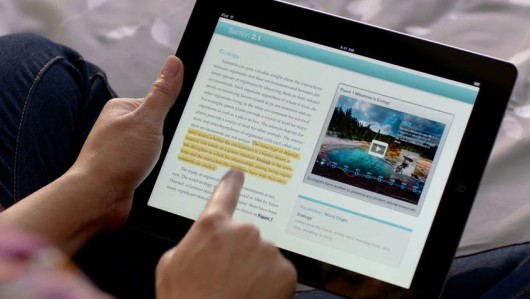
One such
book is E.O. Wilson's Life on Earth. Its
a biology text book which is fully loaded with interactive content. You can
pinch inside a human cell, interactively study the parts of an insect, get
video lessons, visit interactive image galleries related to the topic, test
yourself and get an interactive feedback there and then. Apple has redefined
how a book looks like.
While
these books may be great when it comes to 'reading the content' but when it
comes to the books which concentrate less on the reading material and more on
providing extra questions, the interactive way of learning faces a challenge.
When you add more questions and less of content, you ultimately end up
compromising the interactivity of the book. Which is something you won't want
because the selling point of these books is interactivity, followed by other
supplementary factors.
The
interactive iBooks also have a task of luring the kids into studies, while this
may convert a few students and make them study 'more' but not many will 'start'
studying just because their new books are on a touch-screen device, have a
video or are interactive. Moreover to such kids, the iPad might prove to be
more of a distraction than a learning ground. This is something perhaps no-one
can change and technology's intervention doesn't help.
* iBooks
2 is a free update from Apple's App Store.
 2. iBooks
Author
2. iBooks
Author
This is a
tool for the publishers. The iBooks Author lets you create interactive
textbooks and test them on your device. It provides the Author with an
opportunity to put content or add interactive media. This can be in the form of
an interactive HTML5 widget, a 3D figure, a video or even a simple quiz.
Publishers have a choice on what they can put.
iBooks
Author is just like Instant food. It can create a new book in a matter of
minutes. All you need is, the content to fit in and a suitable collection of
pictures and video. iBooks Author manages almost everything. Also you can test
your book on your iPad before publishing it to the iBookstore. Authors can
choose their own price.
However,
iBooks Author has a large scope of improvement. Not only do authors have
limited control to how their book can look, many of the services are only
linked to Apple's ecosystem. For Example if you wish to add an HTML5 widget you
just can't embed an HTML file. You will need to create a widget using Apple's
proprietary dashcode and then embed it into the iBook. There is also little
modification you can do with a set template. You don't have much say when it
comes to changing the look and feel of the book. This might lead to a set
pattern of stenciled textbooks on the iPad, in the future.
Apple
Likes having a full control in all its products and iBooks Author is no
exception. Its dead closed and all you can do is, play around with the Apple
software. Its like a Garden with many swings, but it is closed on all sides. No
where to escape. No room to expand.
On the
whole the iBooks Author is a good desktop publishing tool but there is a lot
left to desire over here.
3. iTunes
U
iTunes U
has enjoyed a good 4 and a half years of existence. It has been helpful to all
kind of students and provides a good variety of courses from the world's best
universities. Apple decides to expand it now, with an iOS App.

The new
iTunes U iOS App features courses. What are courses? Well, Courses are just
like the courses you might attend at your college. They involve Video Lectures,
Mini Quizzes, Assignments, Study Material and Tests. They are a digital replica
of a college course. Not only does iTunes U help you get all the content, It
also helps you maintain notes, and allows you to search through the study
material and keep a track of your tests.
The
iTunes U App is a nice addition. It is also the most effective way of learning
and grasping content amongst the three announced by Apple.
The App
has a good, clean and sensible UI which allows the users to concentrate on
studying and lets them build a good understanding of whatever they are
learning. Also the Tests, Quizzes and Assignments are very helpful.
--
Summary:
While
Apple may like to portray how revolutionary these new iBooks and this Digital
Content is, It remains to be seen how well it performs. The Book business might
turn out to be as good as the iTunes Music Store or might end up being one of
the few failures Apple has faced in the past decade. Completely changing a
country's education system is a big task, This is just a small step in one
direction. Only time will tell if it is the right direction.
Monday, October 17, 2011
Meet Siri iPhone 4S
Vidit Bhargava
Going by the trend Apple follows with it’s new devices, Apple generally introduces a new design one year, and then stabilizes it the next year (iPhone 3G – iPhone 3GS), so it wasn’t really a surprise when Apple introduced the iPhone 4S with the same design and a few necessary tweaks.
The iPhone has gone through a few very necessary updates, which were sort of expected after the launch of iPad 2. The first one is the A5 Chip. Single Cores are stale talk now, even though the iPhone 4 was blazingly fast, Apple had to throw in their A5 Chip, just to keep pace with others. The 1Ghz Dual Core Chip, with a dedicated Graphics Engine has already proved its strength in the iPad 2, and it’ll be real fun to see how it does in the iPhone 4S. Early reports however suggest that the iPhone chip has been under-clocked to 800Mhz, which doesn’t look like doing bad either.
The camera in the iPhone 4S has gone for a major upgrade, along with a new 8 Megapixel camera, Apple has also played with optics, the new camera now features a CMOS Sensor and 5 lenses instead of four and 1080p recording is now supported. Also the Aperture has widened. Long Story Short: Your new iPhone is capable of clicking photos much like they’ll be shot by a good digital camera.
But it’s a Phone update isn’t it? Just upgrading the camera and the Processor won’t do the trick, it doesn’t impress me! Not to worry, the iPhone 4S comes with a completely new antenna system, which not only corrects its older problems but also makes it a GSM + CDMA Phone, and promises a faster reception and great speeds. Apple also claims it’s the worlds first World Phone. Now that is what I call a Phonely update! There is finally something to upgrade.
Their not done yet, there is also a nice little voice assistant built in the phone. They call it Siri. It’s always that one more feature which makes or breaks the product. Siri is the replacement to Apple’s old aging and pathetic voice assistant which is not even capable of playing a song for me. So it really needs to do well to make this meek update roar in the market.
Originally Siri was an iOS app (which I did not know about until very recently), based on intelligent voice recognition. It was created by Dan Kittlaus, Adam Cheyer, Tom Gruber And Norman Winarsky. Apple bought Siri in April 2010.
When Scott Forstall came on stage to do a live demo of the voice assistant, it was quite a daredevil task, looking back at the history of voice assistant. Things worked out incredibly smooth however. And Siri was the party popper.
Siri, (the iPhone assistant) is a completely different tool from what you may have seen in some iOS apps. Here you can talk to the phone casually, while it tries to produce an appropriate solution, just like an efficient secretary. So if you tell the Phone that you are hungry, it will bring up a list of restaurants near you. Tell her that your car is broken down, and it well get give you a list of nearest car repairs.
Siri at a mere glance looks magical, nearly intelligent and straight from Science Fiction. However Siri comes with it’s own restrictions. One such example is limited language compatibility. Theoretically English is a very widely used language and many people on Earth can speak it. But on the practical side of it, when you are in trouble or desperately need help, you are bound to speak in native language which Siri in all probability, doesn’t understand. Also, Initial Reports suggest that outside US, Siri cannot even look up places or understand your location.
Siri is also efficient at producing Witty remarks, “Siri, can you murder someone for me?” it replies “I found 3 mental health agencies fairly close to you!” . You can find many such remarks at : http://goo.gl/r002M & http://goo.gl/mWWGS .
Summing it up: iPhone 4S is the most stable iPhone to date, and it’s bound to stay for a long time (Just like the 3GS), it’s selling point however lies in Siri, which will have to do incredibly well to save it from a sans-Steve failure. But that looks like a far fetched idea, because initially sales have already shattered servers and records.

Friday, July 01, 2011
Google+ - Review
Vidit Bhargava
Two days back, there wasn't anything known as Google+. There were, what I love saying, remains of social networking disasters. Orkut and Buzz. While Orkut had achieved its purpose and peacefully become dormant, buzz didn't even manage to create a buzz amongst the nerdiest of people. And Tuesday evening, the invite crazy company called Google launched, its yet another social networking service called Google+, in a desperate attempt to make it big in the social network.

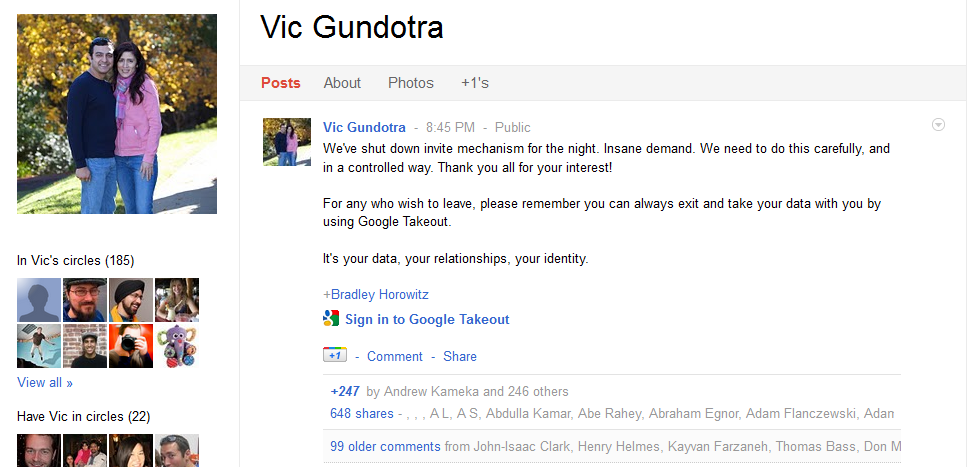
By Wednesday night, my "facebook" feed was flooded with aspirants and early birds. Rejoicing at the Google+ invites. And every such post was flooded with comments, which in general were this: "Can I have an Invite?". " The demand was so high, that Vic Gundotra, the guy leading this project stepped in and closed all the invite mechanisms. However with this big a craze about Google Plus, Loop-holes didn't take much time to surface, and the people flood started to flow again. Even i got a chance to enter, through one of these loop-holes.

Coming to the brass tacks, What Good is Google+? To Start with, What is Google+?
Google+ is facebook in Google Colors. You have the same way of sharing things, you have a very similar interface and you are still socializing.

Two days back, there wasn't anything known as Google+. There were, what I love saying, remains of social networking disasters. Orkut and Buzz. While Orkut had achieved its purpose and peacefully become dormant, buzz didn't even manage to create a buzz amongst the nerdiest of people. And Tuesday evening, the invite crazy company called Google launched, its yet another social networking service called Google+, in a desperate attempt to make it big in the social network.

By Wednesday night, my "facebook" feed was flooded with aspirants and early birds. Rejoicing at the Google+ invites. And every such post was flooded with comments, which in general were this: "Can I have an Invite?". " The demand was so high, that Vic Gundotra, the guy leading this project stepped in and closed all the invite mechanisms. However with this big a craze about Google Plus, Loop-holes didn't take much time to surface, and the people flood started to flow again. Even i got a chance to enter, through one of these loop-holes.
Coming to the brass tacks, What Good is Google+? To Start with, What is Google+?
Google+ is facebook in Google Colors. You have the same way of sharing things, you have a very similar interface and you are still socializing.
The Video Below Demonstrates how Google Plus Works:
Here is a much simple explanation:
Circles: All content is not shared with everyone. You can create various groups and then share, and read content with that particular group. This is something Facebook has failed to do well. People you know (those who are in your gmail contact list) can be added to various Circles. And then you can share your posts with the group you want to share, and not everyone reads what you are posting. There is also the option to share with everyone.

Hangout: Hangout is just Skype from Google. You can video chat with your friends.
Sparks: This is Google Search where you can share stuff with your circles. For Instance i search for a movie review, it will show me all the popular google search results, which i can share with my group. Google+ also allows users to save these searches, as "interests" for any furthur reference.
My views on Google+ :
Sparks: This is Google Search where you can share stuff with your circles. For Instance i search for a movie review, it will show me all the popular google search results, which i can share with my group. Google+ also allows users to save these searches, as "interests" for any furthur reference.
My views on Google+ :
Google Plus has a lot to improve on:
There seems no-option to integrate my buzz account to the live-stream. And this is not so good when you are operating on 3 social networks already, and planning to join the fourth. We need some-kind of connectivity between the three. Google's neat addition to share stuff from any google website is a handy tool but the interface itself is very-buggy. Even the basics of html, like fitting the display area to the screen size are not achieved when not using maximized window. Also Google Apps users are left out again, with a word from google saying that they will soon be able to have their profiles. (This hasn't happened for the past one year, when google said they will allow profiles for apps users willing to come on buzz). The +1 Button is also very vague. A thumbs-up symbol, a love button, anything would have made sense, but +1? Well, its hard to convey the motive to the users.

However, Google Plus still manages to pull of some really cool things, and one of them is sparks. With Sparks sharing content becomes much more fun. And it is also easy to get the news through that. Also eliminating the friends factor helps a great deal, people can follow you, they can read your updates but it is completely up to you to add them in your circle (Similar to twitter's following system). Google Plus is closed field and less prone to population contamination, which makes it niche and more fun to use, for now at least.

Currently Google Plus is in Development stages. It is not the final cut of what the exact thing will so, but it might give facebook some real tough competition.
Here's What my Friends have to say about it:
Vivek Nair : The direct and rather intuitive implementation of circles into the interface is a big (plus) over Facebook, where lists are hidden under a layer. Chat is obviously a big improvement over anything Facebook ever offered and yes, chat logs are also maintained via GTalk, which is good. Group chats are welcome as are hangouts, which is something good and browser integrated. Lack of apps is OK for now, but since this thing is still budding, dunno about how things will turn out.Ankur Banerjee : Things about Google Plus so far..+1: You Can mute notifications for particular posts, unlike Facebook. Any time a post/status gets out of hand, it gets so annoying on facebook.0: Facebook has made me lazy, i don't wnat to click a button to post. I expect it to post on hittting Enter.-1: Item with most recent Activity Gets pushed to top; makes it harder to see newer content in stream.Anunay Kulshrestha : Another social network. Pssh.
My Rating: 6.6/10
Sunday, May 22, 2011
Music Locker
Vidit Bhargava
How many of you own a cloud? Well, as far as I know, many of you own a cloud or two, without even knowing about it! Cloud Computing is the buzz-word these days. Everyone wants to jump into the cloud business. The People are also willing to put their documents on the cloud, rather than carrying them in a pen-drive or a CD. Well Naturally People also want their Music Collection to go everywhere with them and not with an extra-burden of carrying a CD Case or an external hard-disk everywhere. Music Lockers they are called. And Currently two large companies are giving them this facility for free.:

1. Amazon CloudPlayer
Launched in March 2011, Amazon CloudPlayer is one of the few online music lockers, which one can 'use' outside USA. The Amazon Cloud Player, to its U.S. users offers a service to download the tracks from their online store to their cloud Drive and an option to use their Cloud Drive to upload their own songs. So you can listen to the tracks you've already downloaded. You can use your Amazon CloudPlayer ID to play the tracks anywhere in the world.

The Option to Buy the tracks and store directly to the cloud drive, eliminates the computer hard-disk in the process of listening the music. This is a really good thing because it saves the user from the hassle of downloading a song and uploading it back again.
Connectivity: The cloudplayer can be opened from any Web Enabled Device. You just need a good browser and a decent screen size to peacefully play tracks. However you'll find a dedicated application for Android Mobiles (Only in US) also.
 2. Google Music Beta
Google Music Beta was announced at the Google I/O held this month. While Google's Music is very much 'similar' to Amazon's cloudPlayer it is not exactly the same. Google Music provides the users with an online storage for their songs, A Dedicated application for the management and uploading of music, An Android App and a Website that allows you to listen music anywhere. Also Google Music has a feature to work offline on all devices, so if you are out of internet coverage it can play the recently played tracks.
While Amazon does provide users with an option to download the music straight from an online MP3 store. Google has no such option. So basically what you'll have to do is this: Download a song from the internet and then put it back up. And that is a tiresome job.
Connectivity: Google Music is currently in Beta Stages and available by invitation only and the service is only for the US Residents while it is still in the beta stages. As far as Mobile Devices are concerned, Android users are getting an app and others can use the website to play music, which innocently touts a flash interface, blocking the iOS Users from using it.

We just saw two different cloud music lockers. Both of them work on your input. You need to download a song first, and then you need to upload it to the cloud again, just for the sake of using it everywhere. And you are doing this for every song you download, and if this service at all gets popular, the same process will be done by millions of people making millions of duplicates of a single song on the internet, contributing to a lot of Digital Garbage. This is different when you use your iDisks and Dropboxes to put files on the internet, those are unique files you won't find elsewhere. And it is wise to store it on a single location rather than making multiple-copies of the same file on every computer.
Let the Music be on one Single Cloud And let users take the music from there. This way, more and more people can listen to music through one source. Also The Music Locker should directly be connected to the Music Application we currently have on our computers, and Mobile Devices. And if possible we can make it available to everyone in the world and not just the United States (Where every cloudplayer seems confined today).
Wrap Up: Currently Cloud Music is Very Amateurishly implemented. Companies want a lot of input from their users, who are unwilling to take the pains. Cloud-Services need to be tackled differently for every different utility. While the current approach may be good for Text and Picture content, it is naive to think it will be the same for Music and Movies. However, if you are too despirate to use Cloud Music Players, I'd suggest the Amazon Cloud Player, which requires the least effort from your side.
Monday, April 11, 2011

MVDIT TECH BOOK - Upgrade
 In July 2007, I was struck by an idea. The idea was fairly simple. Creating a “Magazine” that would give information about all the latest Tech-Happenings, free of cost. The Digit magazine came with a price tag of Rs. 150, at a time where Information was available free to all through the internet. Why then, should we pay that much to seek Information from one place. Why not, just have a free-to-read e-zine(Electronic - Magazine), for all tech happenings. I wrote about Technology every-month, and posted the same on my blog. Later, This would not continue. MVDIT TECH BOOK, Needed a Website from where the visitors would download the PDF. Fairly Simple to task to make a website, but a mammoth task to have visitors. But that will be talked about later. Over the years, my e-zine has grown from a hobby, to a large project, and most recently I expanded it to the waters of tech-Blogging. Today, I am going to announce, an upgrade to my website and e-zine project.
Simplified HTML5 + CSS3.0 Code:
MVDIT TECH BOOK, has always believed in keeping up with Standards. Its no-use having a web-site that doesn’t run on Multiple Device Platforms. Most of them, today are Mobile Phones and iPads. Since, We Believe, IE6 is getting quite non-existent, and Firefox and Chrome and Safari have taken a place in the World of Tech-Savvy Audience (Our Readers), We have made our website fully equipped and running with HTML5 and enhanced CSS in its blood. The Code has also been “Simplified” reducing the hard-work of updating a website every-time an article is written, or a magazine is published, by more than 80%. A Central File in each directory, now Controls the navigations of the Website. So all of the work of updating a Navigation Panel in each page of the website after an article is written, has been cut-down to 1 in each directory. This also increases the efficiency of our Website.

A New Completely Revamped Design:
We also thought, that along with this major HTML update, we should pep-up the Website UI. We did this by adding a cool-new background to our website, and making the home-page more information friendly than before. Now you don’t need to Look Anywhere for the Latest from our Website. It is there, in front of your eyes, all the time.

The News (Earlier known as Announcements), Reviews, and Games Section has also had a UI shift. We’ve Shifted to a completely new UI, that has never been seen before, on any website. The New UI Provides the User an Interactive Experience while reading the articles. It is as many say, Better Looked at, than talked about!

New Navigation Panel
A Simple Tweek, Suggested by Mudit. The Navigation panel is now slicker and much more proportional. We’ve changed the Announcements to News and Added a new Tab for Archives.

MVDIT ROBO CLUB:
A word about the Robo-Club, You will notice that the MVDIT ROBO-CLUB has gone from the navigation pane. The Robo-Club had been non-functional since the past few months. We had already announced an indefinite suspension of the MVDIT ROBO-CLUB from our e-zine. We haven’t Scrapped the Idea completely and we hope to bring it back with better more efficient ways to operate it.
More Efficient Disqus Comment System
The Disqus Comments System, the one which is used for the “News, Reviews and Games” Section has now been upgraded with Mobile Device Compatibility and Image based comments. Also, Now You can login through any email-account or even anonymously post a comment.
YouTube Channel
YouTube has been one of the most Dormant Section of this E-zine. We have done a little work to improve on it. Initially We Will Be Uploading and Displaying the Company Released Videos of the Latest Announcements, and in the near future we plan to upload our own videos and views on the Latest in Technology.
Wallaby Testing
Wallaby is one of the most interesting pieces of project ever introduced by Adobe AIR. While Adobe maintains its love for the Web-Based Flash Content, at the same time it is providing a choice to the developers to change their Flash Files to an HTML5 and CSS equipped HTML page. Although, in its early development stages, we got a chance to test Wallaby, and We are pleased to know that in the later, more stable editions of Adobe Wallaby, the page-curl “will” most certainly be convertible to HTML5 content and hence be allowed to be played on all platforms.
And One More Thing
We Will Soon Be Upgrading our Domain. More Information will be Provided in the Next Post.
Mudit & Vidit Bhargava
MVDIT TECH BOOK
Sunday, December 26, 2010
MVDIT I.T. Person of the Year 2010

Vidit Bhargava
Julian Assange. That was the "Buzz" word all over the globe. From a low profile hacker, only shown in good quizzes as a tough question to a completely household name that was his transition throught the earth. Born on 3 July 1971 The Whistleblower is primarily the owner of WikiLeaks.
Assange was born in Queensland, Australia and served much of his life living on the magnetic island. In 1987, after turning 16, Julian Assange began hacking under the name "Mendax". He and two other hackers joined to form a group which they named the International Subversives.
In response to the hacking, the Australian Federal Police raided his Melbourne home in 1991. He was reported to have accessed computers belonging to an Australian university, the Canadian telecommunications company Nortel, the USAF 7th Command Group in the Pentagon and other organisations.In 1992, he pleaded guilty to 24 charges of hacking and was released on bond for good conduct after being fined a certain 2100 Australian Dollars. Here is what the prosecutor had to say about him:
"There is just no evidence that there was anything other than sort of intelligent inquisitiveness and the pleasure of being able to—what's the expression—surf through these various computers".
So you see Assange's Magic had already begun. Later in the 20th Century Assange was involved in various activities but none was too big as What would come in the future. Assange once commented that he was actually proud of the hacking phase of his life, and wasn't in the least embarrased.
Wikileaks
WikiLeaks is easily the most important thing that has happened to Julian Assange. In 2006 Wikileaks.org was born. The site claims to have been "founded by Chinese dissidents, journalists, mathematicians and start-up company technologists, from the US, Taiwan, Europe, Australia and South Africa". So you see it is a complete misconception that wikileaks is Assange's creation. There is no formal identification of the Wikileaks but is only represented by Julian Assange and others since January 2007. Assange describes himself as the member of the advisory board.
In March 2010, WikiLeaks released a secret 32-page U.S. Department of Defense Counterintelligence Analysis Report written in March 2008 discussing the leaking of material by WikiLeaks and how it could be deterred. In April, a classified video of the 12 July 2007 Baghdad airstrike was released, showing two Reuters employees being fired at, after the pilots mistakenly thought the men were carrying weapons, which were in fact cameras. In July, WikiLeaks released 92,000 documents related to the war in Afghanistan between 2004 and the end of 2009 to The Guardian, The New York Times and Der Spiegel. The documents detail individual incidents including friendly fire and civilian casualties.
Following on from the leak of information from the Afghan War, in October 2010, around 400,000 documents relating to the Iraq War where released in October. The BBC quoted The Pentagon referring to the Iraq War Logs as "the largest leak of classified documents in its history." Media coverage of the leaked documents focused on claims that the U.S. government had ignored reports of torture by the Iraqi authorities during the period after the 2003 war.
In December 2010. The wikileaks.org domain was killed and just 4 hours later Wikileaks was up again with a completely new domain. Wikileaks.ch . Now thats what you call determination.
So er.. This is what Wikileaks has been doing throughout the year. The rapid growth in the visitor levels have been seen throughout 2010. From a mere hacker Julian Assange had turned into a public figure. Launching leaks one after the other. Ripping (or Opening, whichever you might love to call!) the US Government through the largest leaks the world has ever seen. And All this while sitting at home and sipping a coffee in front of his computer. (ER.. That's not actually true, but Hey it really does sound epic. Ain't it?).
For all that Assange did this year. The James Bond of Hacking. The Whistleblower, Julian Assange gets the MVDIT I.T. Person of the Year Award.
Wednesday, December 15, 2010
Hero of the Year 2010
In a sense, Zuckerberg and Assange are two sides of the same coin. Both express a desire for openness and transparency. While Assange attacks big institutions and governments through involuntary transparency with the goal of disempowering them, Zuckerberg enables individuals to voluntarily share information with the idea of empowering them. Assange sees the world as filled with real and imagined enemies; Zuckerberg sees the world as filled with potential friends. Both have a certain disdain for privacy: in Assange's case because he feels it allows malevolence to flourish; in Zuckerberg's case because he sees it as a cultural anachronism, an impediment to a more efficient and open connection between people.
After reading the extract you won't be surprised at the title. You know now what Time wants to convey through that message. Assange was considered d-villain. Call him the bad guy or Call him James Bond of hacking, its up to you. But the truth is he is the deserving PERSON OF THE YEAR. Even if TIME gives it to the 'Hero', Zuckerberg, who did those supposedly 'good deeds'.
P.S. - Zucker's sure to get on the good kid list of Santa this year :P .
** The post is in no offense to Mark Zuckerberg and intends at causing no harm to the prestigious TIME. These are just the personal views of a blogger.
Tuesday, November 16, 2010
Hotpot For Hotspots
Vidit Bhargava
Google Hotpot was unveiled today. Here's a video that Explains the Google Hotpot:
---
P.S. All content shown in the video was for demonstration purposes. I may not have necessarily visited the place.
Project Titan - Explained in one Video
Vidit Bhargava

Yesterday, Facebook launched a new service which they had been developing for as long as one year. Internally codenamed as Project Titan, the new messaging feature of Facebook is very complex. This post should make it simpler for you!

The Upgrade now page explains a little about what this new thing is about.
But there is still more explanation to be given, so here's a video from Facebook's side to give more information:
Wednesday, June 16, 2010
The New MAC Mini
Vidit Bhargava


Apple just yesterday launched the new MAC MINI. They've updated the whole thing quite a lot. For they've updated the design to a uni-body Aluminium enclosure. The specs have been upgraded and 'there is' an option to manually upgrade the RAM.
So what is this 'MAC mini'? Apple itself doesn't provide computers like we have, either they have an All in one iMac range or they have the MAC Pro which is for the server people. Mac Mini is a mini CPU of sorts. Of Course its branded so you cannot customize much. This is how a MAC Mini looks:

Lets get to some technical specifications.
| 2.4GHz Intel Core 2 Duo | 2GB memory | 320GB hard drive | 8x double-layer SuperDrive | NVIDIA GeForce 320M graphics | Mac OS X Snow Leopard | $699 (nearly 35K in India) |
The specifications are good. The only concerns are the Processors and the 2GB RAM. The Core 2 Duo Processor is good but when you can get the Core i3, i5 or i7 why not add to the mini? The 2GB RAM is also just par. A 3 or 4GB RAM would have been excellent. Also a Wi-Fi and Bluetooth are there and that adds to the + points.
The new Addition to the MAC mini is the Rotatable Lid at the bottom, it opens up to reveal the CPU, and then we can change 'only' the RAM. So if you're unhappy with the RAM config just get hold of a Mac ram and replace it. (Supports upto 8GB only). Other things like the Graphics card and the fan are only for viewing, you can't change them.
At the back of the MAC mini you now get a black panel, which includes:
Power On and of switch, A power plug (no bulky power supplies this time!), 1 Ethernet and Firewire Port, 4 USB 2.0 Ports, SD Card Slot, Headphone and Mic Jacks, A mini -display Port and an HDMI port.
So everything is fine when it comes to the back panel.

Overall, the Device Technically has improved a Ton. However, these are all on the paper, I dont have the actual device.
So now we can ask the question, whether to buy a PC or MAC Mini?
Talking of the Price first:An assembled CPU of the same configuration as of MAC Mini with the Wi-Fi and Bluetooth and others will cost around : Rs. 25K/- (approximately $600). Now we add the software to that : Windows 7 ultimate original for : Rs. 11,000 (i use the original price to make a comparison of equals, pirated versions do come but since I am comparing the two, it will be unfair to use pirated prices) and you would want the latest Office suite : that comes for Rs. 7,000 (again original prices quoted.). So The total Price of the CPU and the Software included comes around : Rs. 40,000/-
Now to the MAC Mini : iLife and OS X come inbuilt in the $699 package which in India after all the duties and taxes will come for nearly : Rs. 38,000 (I may be wrong but this is what I believe going to be the price). You need an iWork Suite which is another : Rs. 4700.
Total Price: Rs. 42,700/-
So the competition in the prices is very close. Other things include the big debate of MAC and PCS. (For me the MAC wins)
[FOR CORE GAMERS : THE PC IS THE BEST OPTION, NO MAC FOR THEM, CASUAL GAMERS CAN CONSIDER THE MAC AlSO]
The verdict :The new MAC mini update is awesome I like it and to the question of whether a MAC Mini or an assembled PC. The competition is close. Its up to you to decide, which one do you want. The price matters very little here.
Image Credit : Apple
---
P.S. There were other big announcements this week : Project Natal (Microsoft Kinect), Nintendo 3DS, PS Move and all the E3 Games. A post on that coming soon! (once the E3 is ove)
Tuesday, June 08, 2010
iPhone 4 - Revealed

Brace yourself There is much to talk about
The much anticipated WWDC 2010 - Event finished a while ago. WWDC was specially kept for the iPhone. No Updates on any other devices. (The iPad an exception.). And since it was mainly on one topic iPhone & Apps, we are sure to have the new iPhone and it is called the iPhone 4.
1st up, the iPhone that gizmodo leaked was real. It was the actual thing! Looking at what new does the iPhone offer to us, lets go in the order they told it to us.
Design: Steve Jobs at the WWDC made a remark "Stop me, if you've seen this before!... believe me you ain't seen this! *followed by heavy roars* ". By this he first addressed the Gizmodo leak and then told the audience that just getting the outer look they didn't spill all the beans. Apple Still managed to surprise us.
They've ripped apart the curves. Its flat and at the back there is no plastic, its glass (the same glass at the front and back). But doesn't that make it fragile? Well, here is the first blower! The glass they've made is 30 times stronger than normal plastic (atleast, they say so.) . It is of the same material as of helicopter windshields. Also, Apple has made a Stainless Steel alloy rim around the phone. The glass back is not only for design, It provides network signals to flow better. Making the 'Phone' even better.

The biggest thing here is the retina Display. When iPhone 3GS, Nexus One and EVO 4G sat together, iPhone's screen was the dullest. They've corrected that. They've introduced this cool Retina Display with a pixel density of 326 pixels per inch. And the pixels go quite small in size, only 78 micrometers across. So the pixelated text we see (only sometimes) is much better and much smoother. Like the iPad they've added the IPS panel. All this makes this display by far the best. (dunno how fast the rivals catch up but certainly not in the near future.).
And when Steve was showing how bright the web looked! The wifi went off... puff... Have you seen that before?
Other enhancements include Front Facing Camera. 5 megapixel back camera with LED flash. Extra mic for Noise Cancellation and yes, not to forget the Micro-Sim tray. For which if you want to use your existing sim. You'll need a mechanical SIM Cutter. And the iPhone is even more thinner than the previous ones. Making it the thinnest smartphone ever.
A Gyroscope. Yes A gyroscope has also been added to the list of sensors. Making this term simpler, The Apple Website explains "More motion gestures and greater precision for an even better gaming experience."
Honestly speaking when the Gizmodo leaked it, I wasn't impressed with the design. It looked raw, to say the least. But now, knowing the technical things in this phone. It looks better. It looks more technically right and technically sound.
2. Coming to the inside hardware: They've added the great A4 chip. This is bound to make it 'fly'. The battery life has also increased: 7 hours on 3G, 14 on 2G, 300 hours on Standby; 40 hours of music ... whew! what else do you want?
3. Software: If Froyo was 'tasty' this is bound to melt it! Packed with iOS 4.0 features, iPhone 4 also has in addition iMovie and 720p video recording. With all that, and the Gyro, and RD added. The iOS 4.0 on iPhone makes Froyo look ordinary.
4. For The Photographers: Nothing new about the 5 megapixel + LED Flash camera with 720p recording. But there is something new also "The backside Illumination Sensors." No grainy Pics! Not even in the Dark! That is what I would say 'cool' enough.

5. The one more thing: FaceTime: Just when our minds where questioning why is there a front facing camera with no video calling. Jobs, announced this. Its the same video calling thing from the front facing camera and what's new? You can go to the rear cam to show what others are doing. Its great but there is just one hiccup. It is currently Wi-Fi only and only for iPhone 4 - iPhone 4 surely, we need that corrected (Apple's working on that) or its waste of good technology.
Pricing? It remains the same for Contract users 'AT&T' $199 for 16GB and $299 for 32GB. That's great, but I've heard from my friends in the US the AT&T plan is exorbitantly priced and their service is poor. For that you can give $499 (16GB) and $599 (32GB) to get the iPhone 4 without contract. That's good.
How can I get it in India? iPhone 4 comes in September in India. Here Airtel and Vodafone will sell the device, by then 3G 'will' be available with these careers and probably they'll correct the video calling thing and history reveals its gonna be above 30K (in Rs.).
If you are one of the impatient ones and have a friend in US. you can get this contract free version and use it in India. ($499 is roughly 23.5-25K).
First Impression: The iPhone has a reputation of providing the 'best touch screen display' and with all these new features things look brighter. Lately, phones probably better than the iPhone 3GS were introduced (Nexus One, EVO 4G, blah blah). iPhone 4 is a solid answer to that and once launched these phones are ready to be knocked out in a single kick!
Here's the launch
----
P.S. Feel free to comment, and do tell how this Extra Long post of mine was (921 words for a fact!). Do tell if I missed something.
Thursday, February 11, 2010
Google Buzz!
 Vidit Bhargava
Today once again we stand at a fork between 2 paths on which is more popular and the other which is better. Buzz was going to be the latest thing in GMAIL since a user of its tried to label the thing in January but couldn't do so. So what is buzz? If you've read today's newspaper and watched yesterday's news its a facebook killer social networking facility. Is it?
After the much anticipated announcement Google states.."Its our first step in Social networking arena", Remember the long dead orkut here? Wasn't it from Google? Anyways, this time Google isn't taking any chance, they're doing their new product the Pritam & Microsoft way. Yeah, they're copying features from other SN sites; Twitter and Fb. You tweet in twitter n do nothing else, same goes here. You just update your status and wait for comments. Like in Fb, people like your status updates, they can even share it, and do stuff. Thats not it, sharing videos and photos is also prevalent. But just like Twitter, you don't have 3rd party apps.
You may ask, that's what a social networking site does, isn't it? Well, yes social networking sites more or less do the same thing but not quite distinctively like buzz does it. You open buzz from your gmail account and you'll find 2 things familiar: One that people are following you and you are following people (taken from twitter, of course) the other being that you can update your status and like or comment on others also (Facebook perhaps!). So you see they're directly taking stuff from other sites.
Twitter started the idea for tweets and following people, its successful. Facebook gave us status updates, like and dislike feature. Today 400 million people use facebook. These sites were unique and they've got their share of credit. Remember, Orkut lost track midway, just because they tried to pick up stuff from Facebook.
However, Google Buzz is not all about copying, it too has something unique about it. Integration with Gmail brings a lot of attention in many people's inbox. This is an instant hit formula, as there are many people on Gmail who don't know much 'bout social networking, they'll get into it very quickly. We also see a location adding feature in mobiles. Also sharing photos with picasa, videos with youtube, blog posts from blogger and brace yourself, tweets with twitter (Yes, the very thing they've picked up the idea from) are good new options which certainly attract people.
While, this article may seem to be all about copying stuff from other sites and how I don't like that but that's what the "New" Google Buzz is about!
Like many other popular people and companies who extract stuff from the less popular sources (like Pritam takes from Korean songs & Microsoft lifts stuff from Apple), Google too is going the same way. That's unfortunate. However, they're products still be hit, they are popular. Be Unique and innovative Google.
Also, not to forget Facebook is getting old and twitter which is still to be popular amongst the youth & common people (only 140 character tweets). Google Buzz is up for grabs for those who want a new social networking platform.
Finally, Its about the people, they are the ones who'll decide for which site to choose. Social Networking works just because of the people & that's the reason I might use it (indirectly of course, I'll use twitter integration. I prefer the better!). There's nothing more that attracts me to use Buzz.
Thursday, January 28, 2010
No room for a third Mac

Yerba Buena Center of Arts in San Fransisco was the place to be yesterday! It experienced something Apple fans had been speculating for years, The iPad. Yes the Tablet we have all talked about for years was finally announced. Sounds like a device we dreamed of for years but wait until you hear the reception from those anticipating its release.
Lets come to it straight away the product clearly states an "i" in the name, what does that mean? It means its neither an iPhone nor a Macbook its different! Its an innovation! Don't expect it to work in case you're hoping to buy a small laptop. Its not meant to be that (Though, we wanted it!).
Apple iPad is a big iPhone, running an iPhone OS 3.2 with capabilities nearly matching a netbook. Yes at around 20,000 bucks the iPad comes with nearly netbook capabilities, still you like it! Its the feeling which is more than any thing else. What iPad does is everything that an iPod Touch couldn't do, with its small screen interface yet it is not your new third Mac!
You wake up... take a cup of coffee to your dining table, there's something else on the table in a nice case with a half eaten Apple logo on it... You open it, no need of the newspaper mate! It's in there... you skim through the headlines then pick it up, place the cover, keep it in your empty school bag and go to school ------> In school u open it, read your text book from the shelf and take down notes.-----> Back at home it's time to read your copy of Harry Potter, you open the iPad again and read it! Finally you can do the homework with pages and then play your favorite game! All that without any paper work, and without having the hassle to switch on your PC or Mac! The possibilities are endless, only if you understand how to use it!
Coming to the hardware specs, it will be a crime to mention how smooth this thing runs, its faster than a netbook guys! Boasts a 1GHz Apple A4 Processor. It has a ten inch screen and it's .5 inches thick. No USB ports here, surely you need to understand what they're making. :)
I'm worried about a few things though, the OS for instance is a let down for the iPad but you need to wait, remember when we got the iPhone? It didn't even have SMS forwarding or MMS but now it has! even a Video Camera is present! You need to wait for the next software update we might see a multitasking iPhone OS in our  hands by June.
 hands by June.
The reception by critics and fans wasn't good, they've disproved of the product completely but they need to understand what this device can do, you cannot deny apple hasn't improved they're products in the past, this too is bound to do the same or they'll fail. I still keep my fingers crossed for the final product may be it improves somewhat!
P.S. : It raises my expectations for the iPhone too, are we going to have the same OS? The same apps? If they're there. iPhone might just take over as the best phone ever! And the Earth Keeps spinning!
Wednesday, January 27, 2010
Read it Live! Apple's new creation!
So what if you couldn't get the invite of the Apple event at Yerba Buena Center of Arts. You can read it here, Live!
Coverage done by Cover it Live!
Coverage done by Cover it Live!
This live coverage is a property of www.coveritlive.com
Subscribe to:
Posts (Atom)